International Payouts: How to Avoid Common Delays
International payouts are one of those things that feel “random” until you know where the delay is actually happening. The good news is that most payout dela...

International payouts are one of those things that feel “random” until you know where the delay is actually happening. The good news is that most payout delays come from a small set of predictable issues, and you can usually prevent them with a simple setup routine.
This guide is written for creators who have international banking, live outside the US/UK, travel a lot, or run multiple platforms. It’s also for anyone who’s had that awful moment of refreshing your bank app and thinking, “Where is my money?”
Important note: payout rules change, and banks change how they screen transfers. Always verify details in your platform’s official payout documentation and with your bank. If you’re dealing with taxes or business registration, this is educational, not legal or tax advice.
Step 1: Identify where the delay is happening (platform vs bank)
Before you change anything, figure out which “stage” is slow. Most creators lose time here by assuming it’s always the platform, when sometimes it’s the receiving bank.
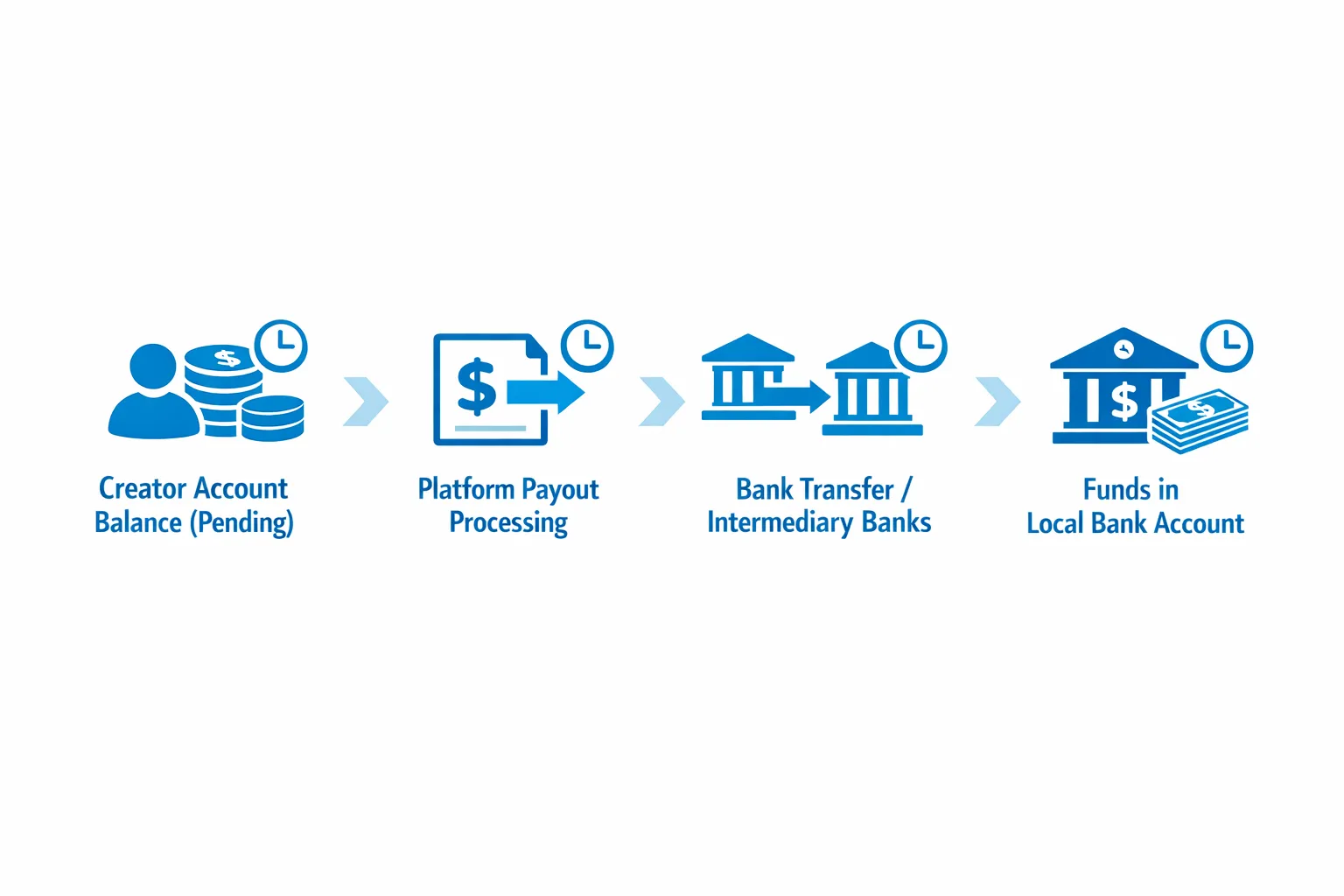
Here’s a quick way to diagnose it:
| Where the delay happens | What it looks like | What to check first |
|---|---|---|
| Earnings not yet eligible (pending/holding period) | Your balance exists, but you can’t withdraw it yet | Transaction status, pending window, recent refunds/chargebacks (if shown) |
| Payout initiated but not received | Platform says “processed/sent,” but no funds in your bank | Payout method details, bank processing times, weekends/holidays |
| Bank compliance hold | No incoming transfer, or bank says it’s “under review” | Your bank’s AML checks, name mismatch, missing transfer reference |
| Incorrect payout info | Payout fails, reverses, or never appears | IBAN/SWIFT, account number format, beneficiary name |
If your platform provides a payout ID, reference number, or transfer receipt, save it. That number is your best friend when speaking to support or your bank.
The most common reasons international payouts get delayed (and how to fix them)
1) Name mismatch (legal name vs “creator name”)
International transfers are picky about the beneficiary name. If your payout profile shows your legal name one way, and your bank has it another way, the transfer can be held or returned.
Fix today:
- Ensure the payout beneficiary name matches your bank account name exactly (including middle names, spacing, accents, and hyphens).
- If you recently changed your name (marriage/divorce), update bank records first, then update your platform.
2) Verification/KYC needs re-checking
Platforms often re-trigger identity checks when something changes, like payout method, location, device, IP pattern, or account security settings.
Fix today:
- Double-check your verification status inside your platform settings.
- Avoid frequent changes to payout methods unless necessary.
- Keep your documents current, clear, and unexpired.
If you’re still getting verified or setting things up for the first time, use a clean step-by-step process (it reduces rejections and rework). See: How to Start, Create & Verify Your OnlyFans Account.
3) Wrong bank details (IBAN/SWIFT, routing format, address fields)
A single wrong digit can turn into a two-week headache.
Common issues for international creators include:
- Using an IBAN but leaving out the country prefix
- Entering a SWIFT/BIC that belongs to a different branch
- Mixing “bank address” and “your address” fields
- Using a card number instead of an account number
Fix today:
- Copy details directly from your bank’s official app or statement.
- Confirm whether your bank requires an intermediary bank for international wires.
If you want a non-platform-specific explanation of how international transfers use SWIFT and why they can be slow, Wise has a clear overview: SWIFT transfers explained.
4) Currency conversion and intermediary banks (the hidden time sink)
When a platform sends money in one currency and your bank receives it in another, your transfer may pass through intermediary banks.
That can create delays because:
- Each intermediary can add its own screening
- Transfers can be routed differently depending on currency corridor
- The receiving bank might wait for full settlement before releasing funds
Fix today:
- Ask your bank: “Do you receive international transfers directly, or via intermediary banks?”
- Check whether your platform offers multiple payout methods, and choose the one most stable for your country (not always the fastest).
5) Weekends, holidays, and cutoff times
This sounds obvious, but it causes a lot of “false panic.” Many payment rails (and bank back offices) operate on business days and local cutoff times.
Fix today:
- Submit payouts earlier in the week if you need predictable timing.
- Expect delays around major holidays in either the platform’s country or your bank’s country.
6) First payout, or “sudden change” payouts
First-time payouts, big spikes, or unusual activity can trigger extra review. This can happen even if you did nothing wrong.
Examples that often trigger review:
- You moved countries or started traveling
- You changed payout method and requested a payout immediately
- Your income jumped rapidly after a viral promo
Fix today:
- If you change payout settings, wait a bit before requesting a large payout (when possible).
- Keep 2FA enabled and your login devices consistent.
7) Bank compliance holds (AML), especially for international adult-income transfers
Banks can hold incoming transfers for additional checks, especially if:
- The incoming transfer name does not match cleanly
- The reference note is missing or unclear
- Your account is new or rarely receives international payments
Fix today:
- Call your bank and ask if there’s a hold on incoming international transfers.
- Ask what documentation they need to release it (sometimes it’s as simple as confirming the sender name).
Tip: Keep a folder (digital) with screenshots of your platform payout confirmation and account ownership details.
8) Country restrictions, regional screening, or regulatory shifts
Some payout corridors become slower over time due to regulatory changes, processor updates, or new screening requirements.
As a creator, you can’t control this directly, but you can reduce your risk by diversifying income streams and building a wider buyer base.
If you’ve been affected by regional friction lately, you may also want to rethink your traffic mix. For example, we covered how regulatory changes can hit a specific market hard in: Italy OnlyFans Age Verification: What Just Happened and How to Save Your Income.
9) Security issues: account access, “helpers,” or shady third parties
Some payout “delays” are actually warning signs of compromised access or risky outsourcing, like someone changing payout details, adding devices, or requesting payouts.
Fix today:
- Enable 2FA.
- Use unique passwords.
- Never share full login access with a random “manager” or “chatter” without contracts and security controls.
If you’re evaluating help, read this first: OnlyFans Scam: How Agencies, Managers and Chatters Rob the Creators.
The International Payout “Prep” checklist (do this before every payout change)
Use this anytime you change banks, move countries, or add a new platform.
- Confirm your legal name matches your bank account exactly.
- Verify your account is fully verified and not in a re-check state.
- Re-check your IBAN/SWIFT/account number from an official bank source (not memory).
- Confirm your bank accepts international incoming payments to your account type.
- Ask your bank if they require an intermediary bank for the currency you receive.
- Avoid making multiple changes (bank + address + payout method) on the same day.
- Save payout receipts/screenshots after every payout request.
- Keep a small cash buffer, don’t run your business at “zero days of runway.”
If privacy is part of your payout stress (like living with family, having a shared mailbox, or worrying about banking statements), you’ll also want to tighten your overall identity separation. Start here: How to Secretly Promote Your OnlyFans (Without Friends or Family Finding Out).
If your payout is late right now: a calm 30-minute troubleshooting flow
Do this in order, and you’ll avoid the usual time-wasting loop.
- Check the payout status in the platform dashboard (pending vs processed vs failed).
- Look for any alerts about verification, document updates, or required actions.
- Confirm the payout destination details letter-by-letter (especially IBAN/SWIFT).
- Check whether the payout was submitted near a weekend/holiday.
- Search your bank app for “incoming,” “pending,” or “international transfer” entries (some banks hide these).
- Call your bank and ask: “Do you see an incoming transfer under review for my account?”
- If the bank needs a reference number, provide your platform payout ID/receipt.
- If the bank sees nothing and the platform says processed, contact platform support with the payout ID and date.
- If a payout failed or reversed, do not re-request repeatedly. Fix the root issue first (name/details), then retry.
A smart long-term move: diversify platforms and payout dependence
If your income depends on one platform and one payout rail, a single policy change, regional friction, or banking issue can freeze your cash flow.
Diversifying does not have to mean “doing everything.” It can mean setting up a secondary platform as a backup income lane.
Two helpful reads:
- OnlyFans vs Fanvue: Which Platform Is Better for Adult Creators in 2026?
- Where to Sell Adult Content & Nudes to Make Money (Top Platforms)
And if you’re scaling marketing internationally, tracking matters. You can’t fix what you can’t see. Here’s how to track conversions by country and traffic source: OnlyFans Tracking Links Guide.
When working with a management agency helps (and when it won’t)
A good management setup won’t magically override banking systems, but it can reduce payout friction by making your operation more consistent.
It tends to help if:
- You’re managing multiple platforms and multiple payout setups
- You travel, move often, or have complex residency/banking situations
- Your account triggers frequent security reviews because of rapid growth
- You’re overwhelmed and missing small details (which cause big delays)
It’s not a great fit if:
- You want full control of every login and workflow, and outsourcing stresses you out
- You’re not consistently posting yet (you’ll be paying for help before you have momentum)
- You are not comfortable with any third-party support, even with boundaries and transparency
If you’re considering professional help, these two guides are worth reading first:
- When to Hire an OnlyFans Management Agency
- 6 Red Flags to Watch Out for Before Signing with an OnlyFans Agency
At Lookstars, we focus on operations that reduce chaos: secure account setup, consistent marketing systems, 24/7 fan chatting, and admin support so you can focus on content. If you want a team to help you run your creator business more smoothly (including keeping payouts organized and predictable), you can learn more here: Lookstars Agency.
Quick reality check (so you don’t blame yourself)
Sometimes a payout delay is just boring banking infrastructure. It does not automatically mean you did something wrong, or that your account is “in trouble.”
But treating payouts like a system, not a mystery, will save you money, stress, and a lot of late-night refreshing.
If you want, tell me your country, payout method, and what status your platform shows (pending/processed/failed), and I can suggest the most likely cause to check first.



Ready to transform your career?
Join hundreds of creators already earning six figures with Lookstars Agency.
Share this article
Best OnlyFans Agency
Europe's Leading OnlyFans Management Agency.

100% Free Ebook
Get our guide and unlock the secrets to OnlyFans success.
100% Free Ebook
Get our guide and unlock the secrets to OnlyFans success.
Free Revenue Calculator & Profile Analyzer
Try them for freeContinue reading...

Am I Attractive Enough for an OnlyFans Agency? The Answer

Can You Ever Fully Delete Your OnlyFans Content? The Reality
