How to Withdraw Money from OnlyFans in Romania
If you’re an OnlyFans creator in Romania, “withdrawal” can feel oddly stressful. Not because the button is hard to find, but because small details (name form...

If you’re an OnlyFans creator in Romania, “withdrawal” can feel oddly stressful. Not because the button is hard to find, but because small details (name formatting, SWIFT fees, currency conversion, bank compliance checks) can turn a normal payout into a delay.
This guide walks you through how to withdraw money from OnlyFans in Romania, plus the Romania-specific gotchas that creators quietly run into.
How OnlyFans withdrawals work (so the steps make sense)
Before you change settings, it helps to understand the payout path in plain English:
- You earn money (subscriptions, tips, PPV, customs).
- OnlyFans applies its platform fee (commonly referenced as 20%).
- Your earnings sit in your available balance once they’re eligible for payout.
- You request a withdrawal to a payout method you’ve added.
- The payment is processed, then your bank (and sometimes intermediary banks) completes the transfer.
Two important realities for Romania:
- International banking rails can add time. Even if OnlyFans processes quickly, your bank may take additional business days.
- Fees and conversion can happen outside OnlyFans. Your bank can charge incoming transfer fees and apply its own FX rate if funds arrive in a foreign currency.
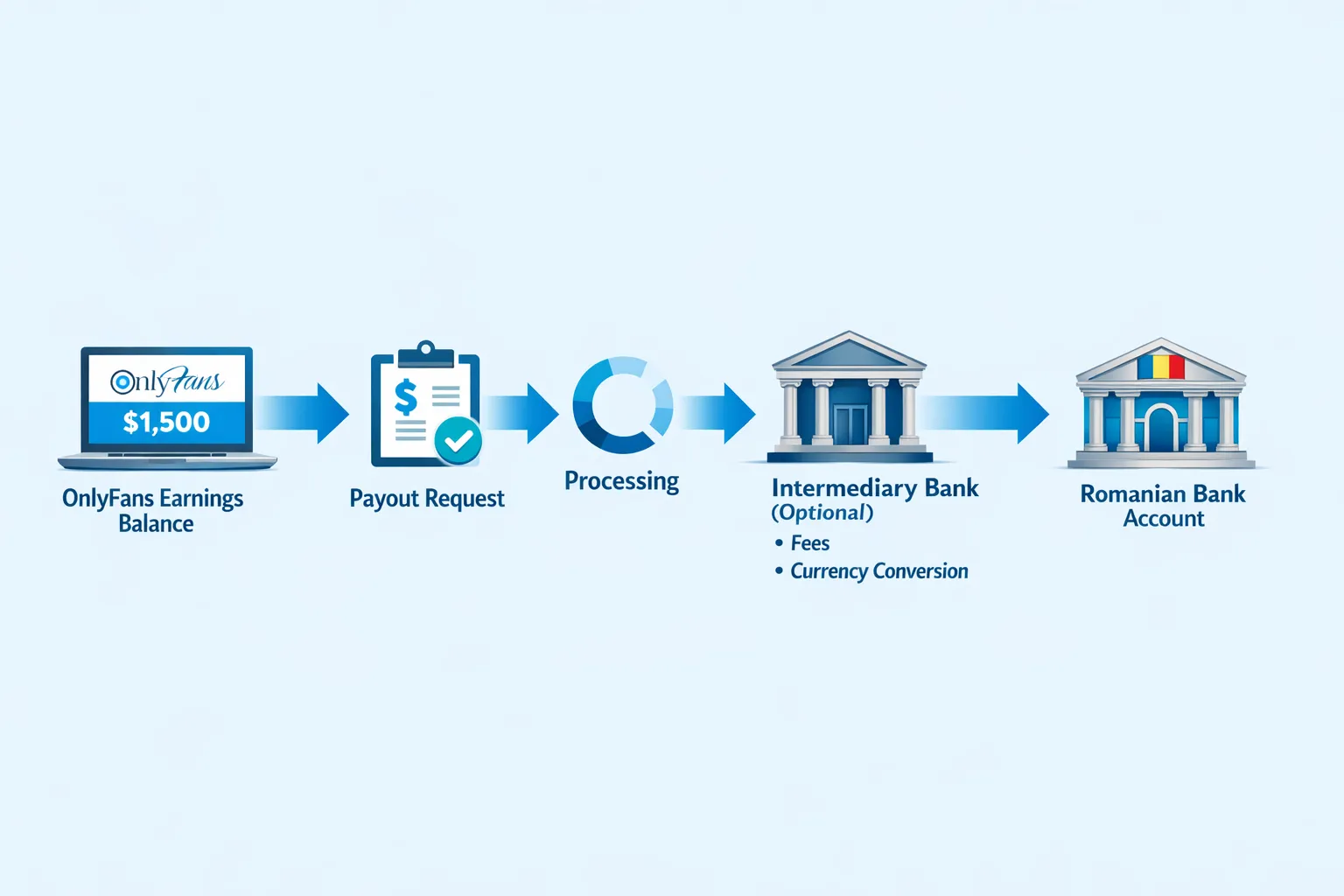
Step-by-step: How to withdraw money from OnlyFans in Romania
The exact menu labels can change over time, but the workflow stays consistent. If anything looks different in your dashboard, cross-check the official OnlyFans help docs.
1) Finish verification and tax profile first
OnlyFans generally requires:
- Identity verification (KYC).
- A tax form appropriate for your country (for non-US creators, this is often a form like W-8BEN, but platforms can change which form or flow they use).
If your verification is incomplete or your tax profile has an error, withdrawals can fail or be held.
2) Choose a payout method you can reliably receive in Romania
Most Romanian creators use a bank account that can receive international transfers. In practice, the “best” choice depends on:
- Whether your bank handles incoming international transfers smoothly
- Incoming fees
- FX spread (how much you lose converting EUR or USD to RON)
- How often you plan to withdraw
Because payout options can change by country and platform policies, treat any payout-method list you see online as “as of that date,” not permanent.
3) Enter your banking details exactly (this is where most mistakes happen)
When adding bank details, be obsessive about accuracy. In Romania, common friction points include:
- Name match: your payout name should match your legal name used in verification.
- Diacritics: if your legal name includes Romanian diacritics (ă, â, î, ș, ț), try to keep it consistent with your bank’s records. If your bank account is recorded without diacritics, use the same format. If you’re unsure, ask your bank how your name appears on their side.
- IBAN: Romania uses IBAN (starts with RO). One digit off can cause a return.
- SWIFT/BIC: if required, confirm it directly from your bank.
4) Do a “micro-check” before your first big withdrawal
If it’s your first payout to a new bank account, consider requesting a smaller withdrawal first. The goal is to confirm:
- Your details are correct
- Your bank accepts the incoming transfer without extra verification
- You understand the net amount after fees and FX
5) Request the withdrawal and track the status
After requesting a payout:
- Watch for a status update inside OnlyFans.
- If it moves to “processed” but you haven’t received it, the delay is usually at the banking stage, not the OnlyFans stage.
For a deeper troubleshooting flow, use Lookstars’ guide: International payouts: how to avoid common delays.
6) Reconcile the payout in your records (especially if you’ll file taxes)
Track each withdrawal as a separate line item in your spreadsheet:
- Date requested
- Date received
- Amount received
- Bank fees (if any)
- FX rate applied (if converted)
This avoids “mystery gaps” later when you compare your OnlyFans earnings vs what actually arrived.
If you want a simple weekly system, this article is built for creators: OnlyFans taxes: weekly habit to stay organized.
Romania-specific payout issues (and what to do about them)
Banking fees and intermediary banks
Some Romanian banks route international transfers through intermediary banks, which can add:
- Extra processing time
- Extra fees deducted before the money hits your account
What to do:
- Ask your bank: “Do you charge incoming international transfer fees? Do you use intermediary banks for USD or EUR wires? What details must be included to avoid returns?”
- If your bank offers multiple account types, ask if one is better for frequent international receipts.
Currency conversion (EUR or USD to RON)
If your payout lands in a currency different from your account’s base currency, conversion happens at the bank (or a card/fintech provider), and the FX spread can be significant over time.
What to do:
- If you withdraw frequently, compare the bank’s FX rate and fees against alternatives you can use legitimately.
- Keep screenshots or statements for recordkeeping.
Compliance holds (AML checks) and “first payout friction”
It’s normal for a bank to be more cautious with:
- First-time incoming transfers
- Higher-than-usual amounts
- Accounts with mismatched names
What to do:
- Keep your verification details consistent.
- Avoid changing payout details repeatedly.
- If your bank asks for information, respond calmly and provide what you can.
Quick troubleshooting table for Romanian creators
Use this to diagnose what’s happening before you panic-refresh for two days.
| What you see | Likely cause | What to do next (fastest safe path) |
|---|---|---|
| Withdrawal is “pending” for longer than expected | Verification/tax profile issue, payout review, or banking backlog | Re-check your verification and tax profile for warnings, then wait for the platform’s processing window. If it persists, contact support with the payout ID. |
| Withdrawal says “processed” but money isn’t in your bank | Bank processing time, intermediary banks, weekend/holiday | Wait 1 to 3 business days, then call your bank and ask if an incoming international transfer is pending. Use the transfer details if available. |
| Withdrawal was returned/failed | IBAN/SWIFT mismatch, name mismatch, bank rejected transfer | Correct the payout details (especially IBAN and legal name formatting) and retry. Consider doing a smaller test payout. |
| Amount received is lower than expected | Incoming fees and/or FX conversion | Ask your bank for a fee breakdown, check whether conversion happened, and document it. |
| Repeated delays every month | Bank/account mismatch with your payout pattern | Consider switching to a bank account better suited for international receipts, and keep payout details stable to avoid triggering extra checks. |
Privacy and safety: what to do before you withdraw
For many women, the bigger fear is not the payout itself, but who could see it, and how it could affect your peace.
A few practical steps:
- Use a dedicated bank account if possible. It reduces accidental “family glance” moments and keeps bookkeeping clean.
- Check statement labeling: banks show incoming transfers differently. If privacy is a concern, ask your bank what appears on statements for international receipts.
- Secure your OnlyFans account: strong password, 2FA, and don’t share login access casually.
If anonymity matters to you (especially in a smaller city), also read: How to secretly promote your OnlyFans (without friends or family finding out).
Tax note for Romania (keep it simple, don’t ignore it)
OnlyFans income is still income.
This is educational, not legal or tax advice. Policies and laws can change. Verify with official sources or a qualified Romanian accountant.
At minimum, keep:
- Monthly earnings summaries
- Payout confirmations
- Bank statements showing deposits
- Receipts for business expenses
When it’s worth getting help (so payouts stop being the bottleneck)
If your withdrawals are fine but your income is inconsistent, the problem usually isn’t the payout button. It’s one of these:
- Traffic is low (not enough new fans)
- DMs are slow (you miss impulse buys)
- Pricing and offers are messy
- Leaks and re-uploads reduce your willingness to post
If you want support across marketing, DM monetization, posting strategy, and leak protection, Lookstars is an OnlyFans management agency built for creators who want to treat this like a business without taking on upfront costs. You can learn how outsourcing compares to doing it solo here: Working with an agency vs running OnlyFans alone.
If you’re considering management, start on the main site and apply: Lookstars Agency.


Ready to transform your career?
Join hundreds of creators already earning six figures with Lookstars Agency.
Share this article
Best OnlyFans Agency
Europe's Leading OnlyFans Management Agency.

100% Free Ebook
Get our guide and unlock the secrets to OnlyFans success.
100% Free Ebook
Get our guide and unlock the secrets to OnlyFans success.
Free Revenue Calculator & Profile Analyzer
Try them for freeContinue reading...

Am I Attractive Enough for an OnlyFans Agency? The Answer

Can You Ever Fully Delete Your OnlyFans Content? The Reality
