How to Withdraw Money from OnlyFans in Uruguay
Getting paid shouldn’t feel like a mystery, but international payouts can be confusing, especially when you’re working from Uruguay and every bank seems to h...

Getting paid shouldn’t feel like a mystery, but international payouts can be confusing, especially when you’re working from Uruguay and every bank seems to have its own rules.
This guide walks you through how to withdraw money from OnlyFans in Uruguay step by step, what to double-check so your payout doesn’t bounce, and what to do if it gets stuck.
Quick reality check (so you don’t waste time)
- OnlyFans payout methods vary by country and can change. The only fully reliable source for what you can use in Uruguay is what you see inside your OnlyFans payout settings (plus official OnlyFans help docs).
- Most payout problems come from “small mismatches,” not big issues, like the name on your bank account not matching your OnlyFans legal name, or incorrect routing details.
- Your bank can be the bottleneck, especially with international transfers (intermediary bank fees, compliance reviews, currency conversion).
If you want a deeper guide on delays and why they happen (platform side vs bank side), this pairs well with: International payouts: how to avoid common delays.
Before you withdraw: the 10-minute setup that prevents 80% of headaches
1) Make sure your account is fully verified
OnlyFans typically won’t process withdrawals if anything about your identity or banking is incomplete.
What to check:
- Your creator verification is approved
- Your payout profile details are filled out (legal name, address, etc.)
- You can access your account email and phone (in case they need to confirm changes)
2) Turn on strong security before touching payout settings
Payout settings are one of the highest-risk areas for account takeovers.
Do this first:
- Enable 2FA (two-factor authentication)
- Change your password to something unique (not reused anywhere)
- Avoid logging in on public Wi-Fi when editing banking details
If privacy is a major concern for you (family, coworkers, or an ex finding your activity), read: How to secretly promote your OnlyFans (without friends or family finding out).
3) Prepare the exact banking details your method requires
What you need depends on what payout methods OnlyFans shows you.
For bank-based payouts, you may be asked for combinations of:
- Account holder name
- Bank name
- Account number
- SWIFT/BIC code
- Branch address
- Additional routing fields (these differ by country and bank)
If you’re unsure, ask your bank in Uruguay what details they require for receiving international transfers and whether your account is set up to receive them (some accounts have restrictions).
Step-by-step: how to withdraw money from OnlyFans in Uruguay
OnlyFans updates their interface from time to time, so the labels may be slightly different, but the flow is usually similar.
Step 1: Go to your payout/banking settings
- Log in to OnlyFans
- Open Settings
- Look for Banking, Payouts, or Payment settings (wording can vary)
Step 2: Choose a payout method that appears for your account
OnlyFans will show only the methods available in your region and for your account status.
Pick one of the available options and continue.
Important: If you saw a creator on TikTok saying “just use X method,” that doesn’t mean it’s available in Uruguay for you. Always trust your dashboard first.
Step 3: Enter your banking details carefully (and match your legal name)
This is where most creators accidentally cause failed payouts.
Use these rules:
- Name match: Your bank account holder name should match the legal name in your OnlyFans payout profile.
- No typos: Re-check every digit and letter.
- Avoid copy-paste errors: Copying SWIFT codes and account numbers is fine, but confirm there are no extra spaces.
Step 4: Complete any security confirmation
Depending on your account security settings, you may need:
- A verification code
- Email confirmation
- A cooldown period before changes fully apply
Step 5: Request a withdrawal
Once your payout method is saved and verified:
- Go to your current balance / statements / payout area
- Choose the withdrawal amount (or withdraw available balance)
- Confirm
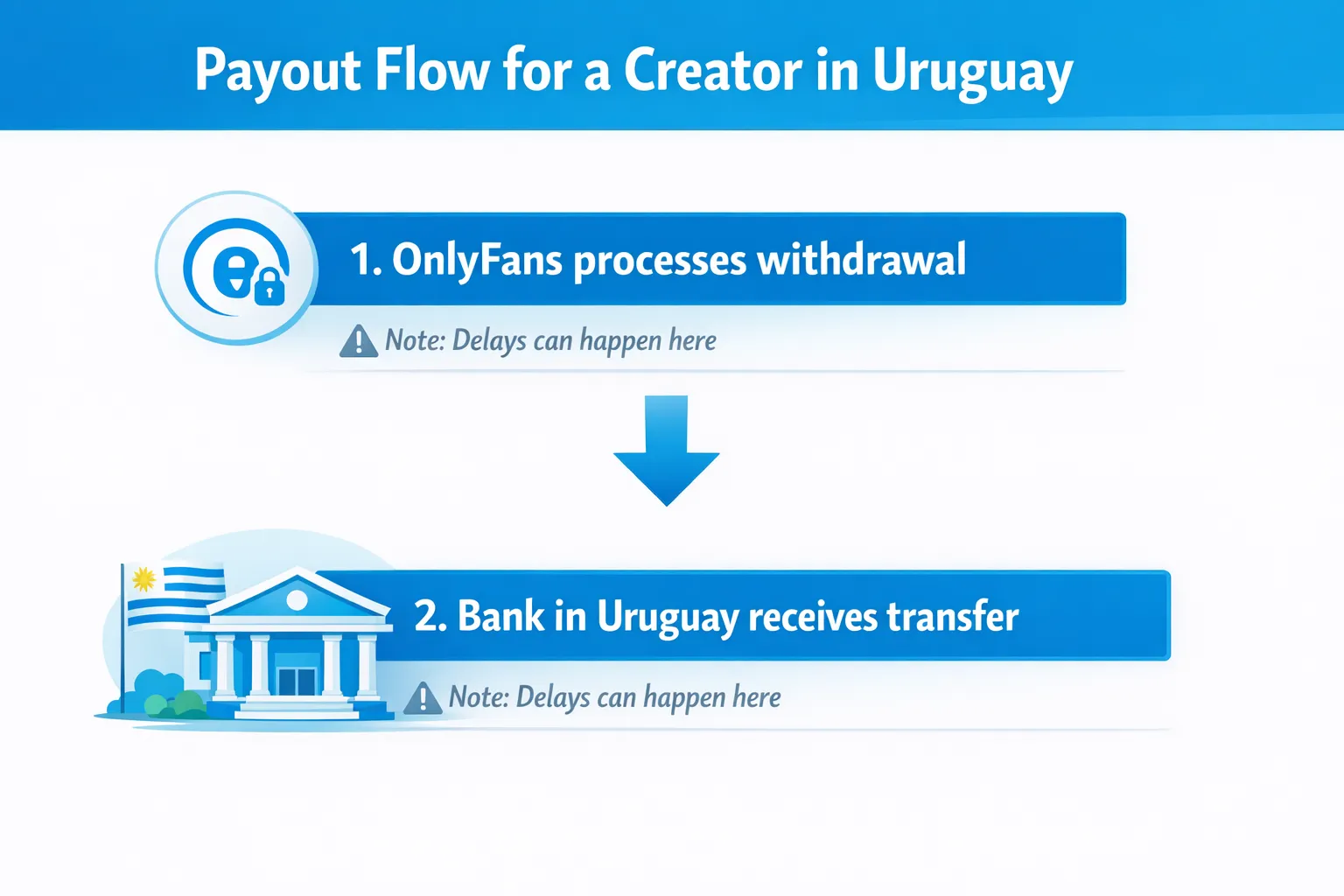
Step 6: Track the payout (platform stage vs bank stage)
When something goes wrong, the fastest way to solve it is to identify where the delay is:
- Platform stage: Still “processing” inside OnlyFans
- Bank stage: Marked sent/paid by OnlyFans, but not received in your bank
That split matters because the fix is different.
Which withdrawal method is “best” in Uruguay? Use this decision table
You might see one or more withdrawal options in your account. Here’s how to choose the most practical one without guessing.
| If you care most about… | Usually prioritize… | Why | Tradeoff to consider |
|---|---|---|---|
| Reliability and fewer moving parts | A direct bank payout method shown in your dashboard | Fewer third parties involved | Bank fees and intermediary bank delays can still happen |
| Getting paid in a specific currency | A method that supports your preferred currency settlement (if offered) | Avoids surprise conversion rates | Availability varies by account/country |
| Faster access to funds | The method with the shortest “expected time” shown in your payout UI (if shown) | Some methods settle quicker than others | Faster methods can still trigger verification checks |
| Lower fees overall | The option that minimizes intermediary steps | Each extra step can add fees | Low-fee options aren’t always available |
Because availability is dynamic, the most practical strategy is:
- Pick the method that is available to you and easiest to verify.
- Run one small test withdrawal first (if that’s possible for your account) before relying on it for your full monthly income.
Uruguay-specific banking and currency notes (what to ask your bank)
Uruguay creators often run into friction not because of OnlyFans, but because international transfers can involve extra compliance and conversion steps.
Here’s what to ask your bank (copy/paste these questions into a WhatsApp message or call script):
- “Can my account receive international transfers from a US/UK-based company?”
- “Do you require an intermediary/correspondent bank for incoming transfers?”
- “What are the incoming wire fees (fixed fee and percentage, if any)?”
- “If the transfer arrives in USD, will it settle in USD or auto-convert to UYU?”
- “How long do incoming international transfers usually take to show in my account?”
- “What exact routing details do you need (SWIFT/BIC, branch address, etc.)?”
Tip: If your bank offers both a local-currency account and a USD account, ask how each one handles incoming international transfers. The “better” option depends on your bank’s fees and conversion rules.
Common payout problems (and the fastest fixes)
| Problem you see | Most likely cause | What to do next |
|---|---|---|
| Withdrawal fails immediately | Incorrect banking info, name mismatch, missing required field | Re-check account holder name, re-enter details exactly as your bank provides them |
| Withdrawal stuck in “processing” longer than expected | Review/verification, high-risk flag, backlog, or account changes | Avoid changing payout details again. Check messages/notifications. Contact support if it’s unusually long |
| OnlyFans shows “paid/sent” but bank hasn’t received it | Bank processing time, intermediary bank delay, or bank compliance hold | Ask your bank to trace incoming transfer using any reference details available |
| You changed payout info and now everything delays | Security safeguards after changing banking details | Wait for the change to fully apply; don’t keep editing settings |
| Small payouts keep “disappearing” into fees | Incoming wire fees + intermediary fees + conversion spread | Compare your bank’s fee schedule, consider consolidating withdrawals less frequently (if your cashflow allows) |
For a detailed troubleshooting flow, read: International payouts: how to avoid common delays.
A simple “payout safety” checklist for Uruguay creators
Use this before every withdrawal (especially if you’re scaling and the amounts are getting serious):
- Confirm your legal name in OnlyFans matches your bank account holder name
- Confirm you’re using the payout method shown as available in your dashboard
- Screenshot (or note) your payout request confirmation (date and amount)
- Avoid payout edits right before withdrawing (they can trigger reviews)
- Keep a clean bookkeeping record: withdrawal date, amount, fees received, net amount in bank
If you want a lightweight habit for staying organized, this guide is solid: OnlyFans taxes: weekly habit to stay organized.
If your payout is late: a calm 30-minute troubleshooting flow
- Check your OnlyFans payout status (processing vs paid/sent).
- Confirm you did not recently change payout details, email, password, or device (security triggers can slow things down).
- Verify your bank details again (especially SWIFT/BIC and account number).
- Check whether it’s a weekend or a bank holiday (either country can affect processing).
- Contact your bank and ask if there’s any pending incoming international transfer or compliance request.
- If OnlyFans shows paid/sent and the bank has nothing after a reasonable wait, contact OnlyFans support with details.
Support message template (copy/paste)
Hi Support, I’m a creator based in Uruguay and I’m having an issue with a payout.
- Withdrawal date:
- Amount:
- Payout method selected in my account:
- Current payout status shown (processing / paid / sent):
- Last 4 digits (or identifier) of the payout/bank account on file (if visible):
My bank confirmed they have not received the transfer yet. Can you confirm whether this payout was sent successfully and provide any available transfer/reference details?
Thank you.
Privacy note: withdrawals can affect your real-world footprint
Even if you’re a no-face creator, payouts connect your business income to real financial systems.
A few practical precautions:
- Use a dedicated bank account if possible (separation helps with privacy and organization)
- Keep statements and notifications locked down (especially if you share devices)
- Don’t share screenshots that show banking details
If you’re worried about safety, boundaries, or anonymity, these two resources help:
- How to make money on OnlyFans without showing your face & stay anonymous
- OnlyFans agency red flags (important if anyone offers to “handle payouts for you”)
Frequently Asked Questions
Can I withdraw money from OnlyFans to a bank account in Uruguay? Yes, many creators can withdraw to a bank account, but the exact payout methods available depend on your OnlyFans dashboard, your verification status, and current provider availability in Uruguay.
Why does my OnlyFans withdrawal say “paid” but I didn’t receive it in my bank? Often the platform has sent the payout, and the delay is at the bank or intermediary bank level (processing time, compliance review, currency conversion). Ask your bank about incoming international transfers and any holds.
Do I need a USD bank account in Uruguay to withdraw OnlyFans earnings? Not always. It depends on your bank and the payout route OnlyFans offers you. A USD account can reduce forced conversions, but fees and availability vary. Ask your bank how international transfers settle.
What’s the most common reason payouts fail for international creators? Small data mismatches, especially the account holder name not matching the creator’s legal name, incorrect routing details, or missing required fields.
Do I have to pay taxes in Uruguay on OnlyFans income? This is educational, not legal or tax advice. Taxes depend on your situation and local rules, and laws can change. Many creators track income and expenses and speak with a local accountant (contador) to stay compliant.
Want fewer payout issues and a smoother money system overall?
If you’re earning consistently and you’re tired of handling everything alone, payouts are usually just one part of a bigger “operations” problem: banking setup, leak risk, content scheduling, and monetizing DMs without burning out.
Lookstars is an OnlyFans management agency that helps creators with growth, DM monetization, operations, and privacy protection, with no upfront costs and flexible cancel-anytime terms.
If you want to explore support, you can apply here: Lookstars Agency.
Before partnering with anyone (including any agency), it’s smart to understand the tradeoffs: Working with an agency vs running OnlyFans alone.


Ready to transform your career?
Join hundreds of creators already earning six figures with Lookstars Agency.
Share this article
Best OnlyFans Agency
Europe's Leading OnlyFans Management Agency.

100% Free Ebook
Get our guide and unlock the secrets to OnlyFans success.
100% Free Ebook
Get our guide and unlock the secrets to OnlyFans success.
Free Revenue Calculator & Profile Analyzer
Try them for freeContinue reading...

Am I Attractive Enough for an OnlyFans Agency? The Answer

Can You Ever Fully Delete Your OnlyFans Content? The Reality
