How to Withdraw Money from OnlyFans in Switzerland
Withdrawing your OnlyFans earnings in Switzerland is usually straightforward, but the small details matter, especially with Swiss IBAN formatting, currency c...

Withdrawing your OnlyFans earnings in Switzerland is usually straightforward, but the small details matter, especially with Swiss IBAN formatting, currency conversion, and bank compliance checks. If your payout gets rejected or “stuck,” it’s almost always one of a few fixable issues (name mismatch, wrong bank fields, KYC, or intermediary bank friction).
This guide walks you through a clean Swiss payout setup, what to double-check before you request a withdrawal, and how to troubleshoot delays without panicking.
Quick reality check (so expectations are healthy)
- OnlyFans payout options and rules can change, and what you see in your account depends on your country, verification status, and sometimes your account history.
- Switzerland adds a common twist: your bank may convert the incoming currency to CHF, and sometimes fees can appear from intermediary banks.
- If this is your first withdrawal, it can take longer than later payouts.
If you want a broader “why is my payout late?” breakdown (not Switzerland-specific), this guide helps: International payouts: how to avoid common delays.
What you need before you withdraw (Swiss creator checklist)
Before touching payout settings, make sure these basics are done, because they’re the #1 reason withdrawals fail:
- Identity verification complete inside OnlyFans (your account is approved, not “in review”).
- Your legal name matches your bank account holder name exactly (including middle names if your bank has them on file).
- Your payout method is added and saved (and hasn’t been flagged for review).
- Your bank account can receive international transfers (some accounts have limitations).
- You understand the difference between “available/current balance” and “pending balance” (some earnings have a holding period before they become withdrawable).
If you are still setting up your account, this beginner walkthrough can save time: How to start, create & verify your OnlyFans account.
Step-by-step: How to withdraw money from OnlyFans in Switzerland
The exact menu labels can vary slightly, but the flow is consistent.
1) Add your payout method
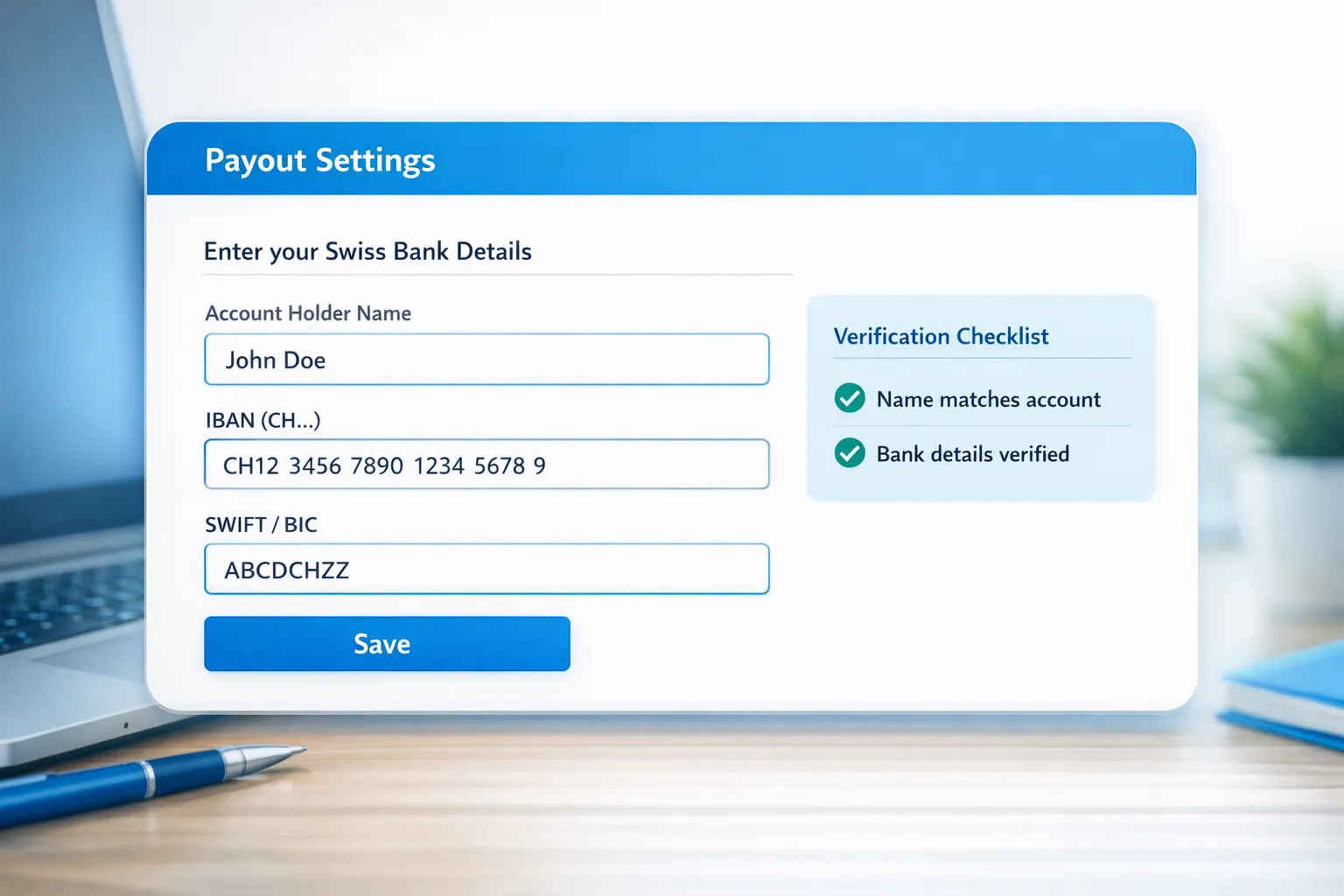
Inside your OnlyFans settings, look for Banking, Payouts, or Payment Settings, then add a payout method.
For Switzerland, you will typically be asked for bank details such as:
- Account holder name (must match your legal name on your bank)
- IBAN (Swiss IBAN usually starts with CH)
- BIC/SWIFT (your bank’s SWIFT code)
- Bank name and address (sometimes required)
Tip: copy-pasting an IBAN is fine, but remove extra spaces if the form rejects it.
2) Confirm what currency you will receive
Switzerland is CHF-first for most creators’ real-life expenses, but your incoming payout might not arrive as CHF.
What can happen:
- OnlyFans sends the payout in a supported currency for that payout route.
- Your Swiss bank receives it and converts it into CHF (often with a spread).
If you want more control over conversion, some creators use multi-currency accounts (for example, Wise or Revolut) as the receiving bank account, but you must confirm your OnlyFans account allows that payout setup and that the account is in your legal name.
3) Request a withdrawal
Once your balance shows as withdrawable, request a payout.
Practical notes:
- Weekends and bank holidays can add delays (platform processing plus bank processing).
- Your first payout can be slower.
- If the payout fails, the reason is often shown in your payout history, or it triggers an email.
4) Track it like a business transaction (even if you’re “just starting”)
When you withdraw, create a simple log:
- Date requested
- Amount requested
- Amount received (CHF)
- Bank fees (if any)
- Notes (conversion rate looked good or bad, delayed, rejected)
This is not just for “being organized,” it helps you spot patterns like a specific bank consistently charging incoming fees.
For a lightweight system, use this routine: OnlyFans taxes: a weekly habit to stay organized.
Switzerland-specific payout details that trip creators up
Swiss IBAN and SWIFT/BIC mistakes
Swiss banking data is clean and standardized, but payout forms can be picky.
Common issues:
- Typo in IBAN (even one digit)
- Wrong SWIFT/BIC
- Using someone else’s bank account (partner, friend, joint account) when the legal name doesn’t match
If you want a zero-drama setup: use a bank account in your own legal name, and match your OnlyFans profile payout name to it.
Currency conversion and “missing money” anxiety
If you withdraw $X and receive less in CHF than you expected, it’s usually one of these:
- Exchange rate spread
- Incoming transfer fee
- Intermediary bank fee
You do not need to assume something shady happened. Most of the time it’s just banking mechanics.
Bank compliance holds (rare, but real)
Swiss banks can sometimes pause an incoming transfer for compliance checks, especially if:
- It’s your first time receiving funds from a new sender
- The transfer looks unusual compared to your account history
- Your bank needs clarification on the transfer source
If this happens, call your bank and ask what they need. Keep your answers simple and consistent: you are receiving creator income from a subscription platform.
Which payout setup should Swiss creators choose? (Simple decision framework)
You’re choosing between convenience, control over FX, and privacy comfort.
Here’s a practical comparison to help you decide.
| Swiss payout setup | When it makes sense | Pros | Tradeoffs / risks |
|---|---|---|---|
| Swiss personal bank account (CHF) | You want the simplest setup and don’t care about FX optimization | Simple, familiar, easy bookkeeping | Currency conversion and fees may be less predictable |
| Swiss bank account that supports EUR well | You spend in EUR often (travel, cross-border life), and your bank handles EUR smoothly | Can reduce friction if your incoming payout is EUR | Still depends on the payout route and bank policies |
| Multi-currency account in your legal name | You want more visibility and control over conversions | Often clearer FX visibility and faster account management | Must be accepted by OnlyFans and may still face compliance checks |
| Separate bank account for creator income | You want stronger privacy boundaries and cleaner bookkeeping | Cleaner records, easier tax prep, better boundaries | Slight admin overhead (another account to manage) |
If privacy is a major concern, you’ll also want to review your overall safety setup (not just banking). This guide is helpful: How to secretly promote your OnlyFans (without friends or family finding out).
30-minute troubleshooting flow (when your payout is late)
If your withdrawal hasn’t arrived, do this in order.
Step 1: Check payout status inside OnlyFans
Look for status wording like pending, processing, completed, failed, reversed, or rejected.
- Failed/rejected usually means a details issue (name, IBAN, SWIFT, unsupported account type).
- Processing/completed usually means it has left OnlyFans and your bank is the bottleneck.
Step 2: Verify the “boring” details that cause 80% of problems
- Name matches your bank exactly
- IBAN is correct
- SWIFT/BIC is correct
- Your bank account can receive that transfer type
Step 3: Consider timing
- Was it requested on a weekend?
- Was it near a bank holiday?
- Is this your first payout?
Step 4: Call your bank (script you can use)
You can say:
“Hi, I’m expecting an incoming international transfer to my account. Can you check if anything is pending, held, or needs additional verification on your side?”
If they ask for sender details, use whatever info appears in your payout record.
Step 5: If it’s still unclear, contact OnlyFans support
Be ready with:
- Date and amount of withdrawal
- Payout method used
- Any reference IDs visible in your payout history
- Screenshot of the status
Common payout problems for Swiss creators (and how to fix them)
| Problem you see | Likely cause | What to do next |
|---|---|---|
| Withdrawal rejected quickly | Wrong IBAN/SWIFT, or name mismatch | Re-check bank fields, ensure legal name match, then re-submit payout method |
| Shows “completed” but nothing arrived | Bank processing delay, intermediary bank | Wait 1 to 3 business days, then call your bank to trace incoming transfer |
| First payout is taking longer | Extra checks for new accounts | Be patient, make sure KYC is fully complete, avoid changing bank details repeatedly |
| You received less than expected in CHF | FX conversion and banking fees | Ask your bank about incoming fees, compare conversion spreads, consider a different receiving account |
| You’re nervous about privacy on statements | Statement descriptors and account visibility | Use a separate bank account, strengthen country blocking and privacy settings |
Privacy and safety notes (important in Switzerland too)
Withdrawing money is not just a finance step, it’s a privacy step.
A few creator-friendly best practices:
- Use a separate email and strong passwords for your OnlyFans account.
- Turn on 2FA wherever possible.
- Consider a separate bank account if you share finances with a partner or family.
- Use country blocking if you’re trying to reduce the chance of local discovery.
If you’re dealing with leaks or stolen content, payout stability can also suffer because account stress leads to rushed decisions. Protecting your business matters.
When it’s worth getting help (and when it’s not)
You probably do not need an agency just to withdraw your money.
But support can make sense if:
- Your income is growing and you want clean operations (payout tracking, promo tracking, consistent posting).
- You’re losing money to slow DMs and missed upsells.
- You’re dealing with leaks, impersonators, or privacy threats.
- You want to expand beyond OnlyFans (Fansly, OFTV, other platforms) without burning out.
If you’re deciding between staying solo vs outsourcing, this breakdown helps: Working with an agency vs running OnlyFans alone.
Frequently Asked Questions
Can I withdraw OnlyFans earnings to a Swiss bank account (IBAN)? Yes in many cases, Swiss creators use an IBAN-based bank transfer setup. Availability depends on what payout methods OnlyFans shows in your account.
How long do OnlyFans withdrawals take in Switzerland? It varies based on the platform’s processing, your withdrawal history, weekends and bank holidays, and your bank’s incoming transfer handling. First payouts can take longer.
Why did I receive less money than I withdrew? Currency conversion and bank fees are common reasons, especially when payouts arrive in a different currency and are converted to CHF.
What’s the most common reason a payout gets rejected? Bank detail errors (IBAN, SWIFT/BIC) and account holder name mismatches are the most common fixable causes.
Do I need a separate bank account for OnlyFans income? It’s optional, but many creators prefer it for privacy boundaries and cleaner bookkeeping. This is educational, not legal or tax advice.
Want your OnlyFans income to feel consistent, not chaotic?
If you’re earning already but withdrawals, tracking, DMs, and promotion feel like a second full-time job, that’s usually the point where creators start losing money to overwhelm.
Lookstars is an OnlyFans management agency that supports creators with marketing, 24/7 fan chatting, posting strategy, leak protection, and privacy setup, with no upfront costs and flexible, cancel-anytime contracts.
If you want to scale while protecting your time and boundaries, you can apply here: Lookstars Agency.



Ready to transform your career?
Join hundreds of creators already earning six figures with Lookstars Agency.
Share this article
Best OnlyFans Agency
Europe's Leading OnlyFans Management Agency.

100% Free Ebook
Get our guide and unlock the secrets to OnlyFans success.
100% Free Ebook
Get our guide and unlock the secrets to OnlyFans success.
Free Revenue Calculator & Profile Analyzer
Try them for freeContinue reading...

Am I Attractive Enough for an OnlyFans Agency? The Answer

Can You Ever Fully Delete Your OnlyFans Content? The Reality
