How Long Does OnlyFans Take to Pay? Days, Weeks, or Months?
If you’re staring at your OnlyFans balance thinking, “Why isn’t this in my bank yet?”, you’re not alone. Payout timing on OnlyFans is usually not “instant”, ...

If you’re staring at your OnlyFans balance thinking, “Why isn’t this in my bank yet?”, you’re not alone. Payout timing on OnlyFans is usually not “instant”, and the wait can feel confusing because there are multiple stages between a fan paying and money landing in your account.
This guide breaks down the payout timeline in plain English (days vs weeks vs “why does it feel like months?”), the most common delay causes, and what to do today to get paid faster and more reliably.
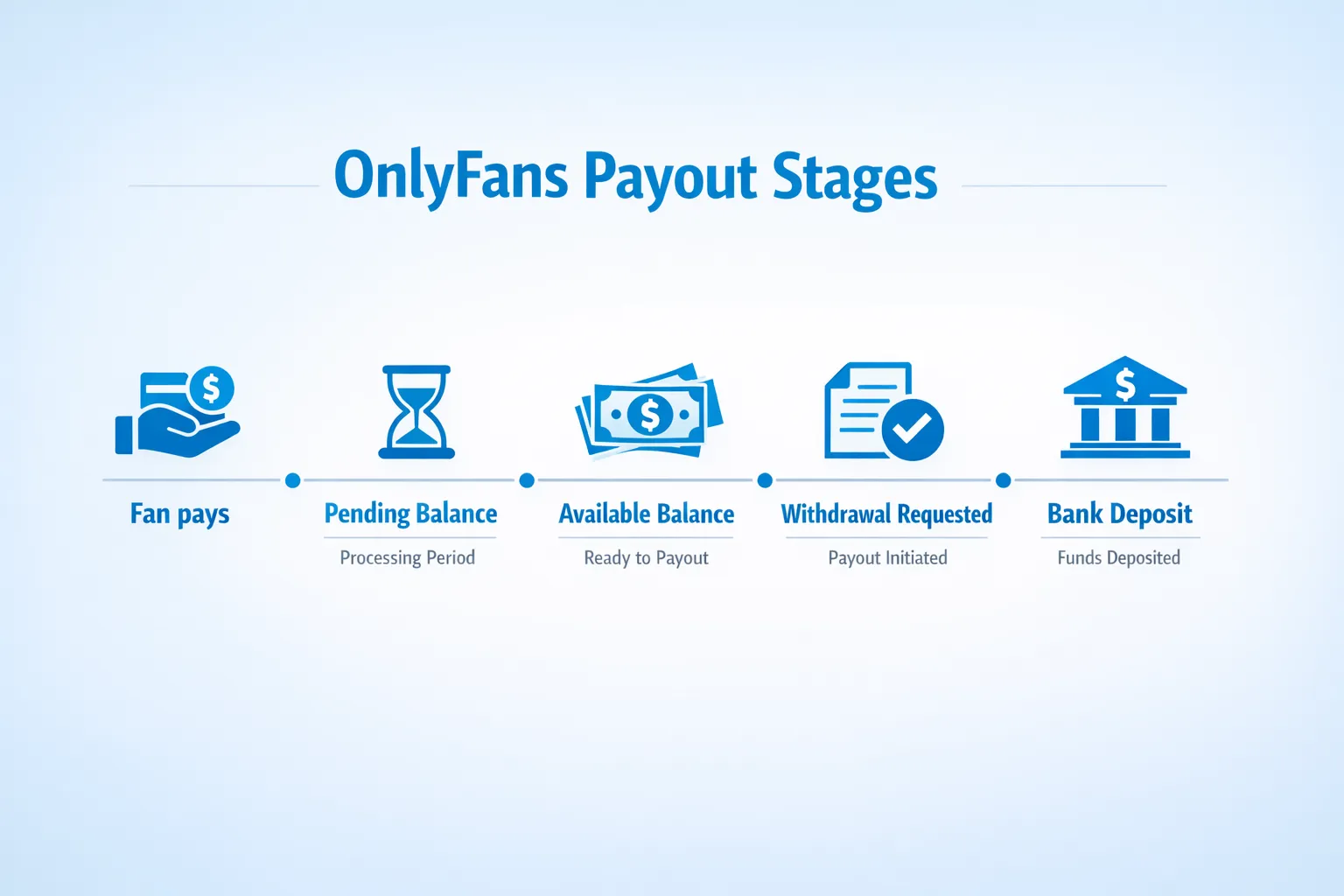
The OnlyFans payout timeline (the 5 stages that matter)
Think of your payout as a pipeline. Most “delays” happen because creators assume stage 1 and stage 5 are the same thing.
- A fan pays (subscription, tip, PPV, etc.)
You made the sale. Great. But that does not automatically mean the money is withdrawable.
- Your earnings sit in a “pending” state
Platforms typically use a pending window to reduce risk around card processing, refunds, chargebacks, and fraud checks. OnlyFans has its own rules for when funds move from pending to available, and these rules can change, so always double-check inside your account and/or the OnlyFans Help Center.
- Your funds become “available” to withdraw
This is the point where you can request a payout (withdrawal). If your money is still pending, you can’t speed-run it with a button.
- You request a withdrawal
Some creators get stuck here without realizing it: they’re waiting for a payout, but they never actually requested one, or they’re under a minimum threshold.
- OnlyFans processes it and your bank (or payment provider) settles it
Even after a payout is marked “processed” on the platform side, banks can take additional time (especially on weekends, holidays, and international transfers).
Here’s the pipeline in one view:
| Stage | What you’ll see | What it means | What you can do now |
|---|---|---|---|
| Sale made | New earnings | A fan paid | Keep records (earned vs paid out) |
| Pending | “Pending” balance | Not withdrawable yet | Wait, avoid frequent payout-method changes |
| Available | “Available” balance | Eligible for withdrawal | Request payout when it fits your cashflow |
| Withdrawal requested | Payout “requested” | Waiting for processing | Monitor status, don’t spam changes |
| Settled | Money in bank | Transfer completed | Reconcile and log it for bookkeeping |
So… days, weeks, or months?
When it’s days
Payouts can feel fast when:
- You already have funds in available (not pending).
- Your payout method is verified and stable.
- You request a withdrawal early in the week (banking systems can slow down on weekends).
- Your bank or payment provider settles transfers quickly.
When it’s weeks
It commonly stretches into weeks when:
- A significant part of your balance is still pending.
- It’s your first payout (first-time withdrawals are often slower on many platforms).
- You’re using an international payout route with currency conversion or intermediary banks.
- There’s a compliance or security check (name mismatch, verification issue, unusual login activity).
If you’re outside the US, you’ll want to read this deeper troubleshooting guide: International payouts: how to avoid common delays.
When it feels like months
“Months” usually happens because of one of these situations:
- You’re not requesting withdrawals, so money just sits as available.
- You’re under the payout minimum, so you can’t withdraw yet.
- Your payout is repeatedly failing (bank details format issues, beneficiary name mismatch, wrong account type).
- Your bank rejects or holds the transfer and you don’t realize it’s bank-side.
If this is you, skip ahead to the 30-minute checklist below.
The most common reasons OnlyFans payouts get delayed (and how to diagnose them)
There are two buckets: platform-stage delays and bank-stage delays.
Platform-stage delays
1) Pending balance not cleared yet If earnings are pending, you’re waiting on the platform’s internal timing. This is normal, but it can be stressful if you’re relying on that cash.
2) Verification or compliance issues If something about identity, payout details, or account security needs review, payouts can pause. Policies change, so rely on what your dashboard shows and any official emails.
3) First payout friction First withdrawals often trigger extra checks. This is especially common if you’ve recently changed payout details.
4) Refunds, chargebacks, or reversed payments If a transaction gets reversed, it can affect what becomes available.
Bank-stage delays
1) Weekends and bank holidays Banks process on their own schedules. A payout requested Friday night can feel “stuck” even if nothing is wrong.
2) Incorrect bank details or formatting International formats (routing numbers, SWIFT/IBAN equivalents, local bank codes) are a top cause of silent failures.
3) Name mismatch (KYC mismatch) Your payout account often needs to match your legal identity details.
4) Intermediary banks and currency conversion Cross-border transfers sometimes go through intermediaries, which adds time and potential fees.
For country-specific examples, see: OnlyFans banking and payments in Mexico.
A 30-minute “Where is my money?” troubleshooting checklist
If you need a calm, practical flow, do this in order. Don’t jump around, you’ll miss the obvious.
Step 1: Identify the exact stage (2 minutes)
Open your earnings/payout area and answer:
- Is your money pending or available?
- Do you see a payout marked requested, processing, processed, failed, or similar?
Your next move depends on this.
Step 2: Confirm you’re eligible to withdraw (5 minutes)
- Check whether you’re above the minimum payout threshold shown in your dashboard.
- Confirm you’re not trying to withdraw more than your available balance.
Step 3: Verify payout details with “copy exact, no guessing” (10 minutes)
- Re-check every field: name spelling, account number, routing codes, bank address if required.
- If you updated anything recently, assume that change is the cause until proven otherwise.
Tip: Take screenshots for your records before changing anything again.
Step 4: Separate “platform processed” vs “bank received” (5 minutes)
- If the payout is still not processed, it’s platform-side.
- If it’s processed but not in your bank, it’s usually bank-side settlement time, bank holds, or routing issues.
Step 5: Search your email for official messages (3 minutes)
Look for payout failure notices, verification requests, or security alerts.
Step 6: Contact support with a complete packet (5 minutes)
When you contact support, include:
- Payout date/time requested
- Amount
- Status shown
- Last 4 digits (or identifier) of the payout method (never send full sensitive banking info if it’s not required)
- Screenshots of the status page
This reduces back-and-forth and speeds resolution.
How to prevent payout stress (even if a payout runs late)
Creators who feel “paid late” usually have a cashflow system problem, not just a platform problem.
Use the “two-bucket” money habit: earned vs paid out
OnlyFans income is messy if you don’t separate:
- Earned (sales happening today)
- Paid out (cash you can actually spend)
A simple tracker helps you avoid panic and tax surprises.
| Column | What to log | Why it matters |
|---|---|---|
| Date earned | Day the fan paid | Matches your performance and promos |
| Income type | Sub, tip, PPV, custom | Helps you see what drives revenue |
| Gross amount | Before fees | Clean baseline |
| Platform fees | Platform % and other fees | Tracks true margin |
| Net earned | After platform fees | More realistic revenue |
| Payout requested date | When you withdrew | Predicts cash arrival |
| Payout received date | When it hit your bank | Lets you spot patterns |
If you want a creator-friendly system, these two guides pair well:
Don’t rely on one platform for rent money
This is not fear-mongering, it’s just operational reality. Adult platforms and banks can have friction.
If you’re building serious income, consider diversifying across 2 to 3 platforms so a payout delay doesn’t freeze your entire business. Here’s a comparison to start with: Where to sell adult content & nudes to make money (top platforms).
When it makes sense to get help (and what to ask for)
If you’re new, it’s normal to handle payouts yourself. But once you’re scaling, payouts become part of your operations.
Consider outsourcing or getting professional support when:
- You’re earning consistently, but admin tasks are stealing time from content and promotion.
- You’re dealing with international banking friction repeatedly.
- You’re overwhelmed and missing withdrawals, mixing finances, or feeling anxious every payout cycle.
If you’re comparing solo vs support, this decision guide helps: Working with an agency vs running OnlyFans alone.
If you do talk to an agency or manager, be picky. Ask direct questions about payout handling, transparency, and access control. Start here: 6 red flags to watch out for before signing with an OnlyFans agency.
Where Lookstars fits (if you want a done-with-you system)
Lookstars is an OnlyFans management agency that supports creators with growth and operations, including marketing, 24/7 fan chatting, content planning, privacy setup, and leak protection. If you want to spend less time on admin (including payout troubleshooting and cashflow routines) and more time creating, you can learn more at Lookstars Agency or apply directly through the site.
We’re also transparent that management is not for everyone. If you prefer full control and you enjoy the day-to-day operations, staying solo can be the best choice.
The takeaway
OnlyFans payouts rarely take “months” because the platform is holding your money for no reason. Most long waits come down to pending windows, not requesting withdrawals, bank-side settlement delays, or fixable payout detail issues.
If you do one thing today: open your dashboard, confirm pending vs available, and start tracking earned vs paid out. That alone removes 80% of payout anxiety for most creators.



Ready to transform your career?
Join hundreds of creators already earning six figures with Lookstars Agency.
Share this article
Best OnlyFans Agency
Europe's Leading OnlyFans Management Agency.

100% Free Ebook
Get our guide and unlock the secrets to OnlyFans success.
100% Free Ebook
Get our guide and unlock the secrets to OnlyFans success.
Free Revenue Calculator & Profile Analyzer
Try them for freeContinue reading...

Am I Attractive Enough for an OnlyFans Agency? The Answer

Can You Ever Fully Delete Your OnlyFans Content? The Reality
