AI Tools for OnlyFans DMs: Safe Use Without Sounding Fake
Your DMs are where the money (and the emotional labor) lives on OnlyFans. They’re also the fastest place to burn out, especially when you’re trying to be “on...
Your DMs are where the money (and the emotional labor) lives on OnlyFans. They’re also the fastest place to burn out, especially when you’re trying to be “on” for dozens of conversations a day.
AI can help a lot, but only if you use it like a drafting assistant, not a robot that talks for you.
This guide will show you exactly how to use AI tools for OnlyFans DMs safely, keep your voice, protect your privacy, and avoid that cold “copy-paste” vibe that makes good subs disappear.
The real goal of AI in OnlyFans DMs (and what it’s not)
Think of AI as your behind-the-scenes assistant that helps you:
- Reply faster without sounding rushed
- Stay flirty, clear, and consistent when you’re tired
- Handle repetitive questions (pricing, customs, boundaries) without retyping
- Upsell PPV in a way that fits the conversation
- Re-engage silent subs without sounding needy
AI should not be used to:
- Send fully automated messages without review (high risk for tone, mistakes, and policy issues)
- Pretend to be “you” in situations where details matter (customs, consent, boundaries)
- Store or share sensitive personal data (yours or the fan’s)
If you want a deeper sales framework for spicy conversations, pair this article with the messaging strategy in our OnlyFans sexting guide.
“Safe use” rules: protect your account, privacy, and brand voice
Policies and enforcement can change, so always verify the latest rules in the official OnlyFans Terms of Service and any help-center documentation. The safest approach is a human-in-the-loop workflow.
Here’s a practical safety checklist you can adopt today.
AI safety checklist for OnlyFans DMs
- Do not paste your legal name, address, banking details, contracts, ID info, or login info into any AI tool.
- Do not paste fan payment details or anything that could identify them offline.
- Assume every prompt could be stored (even if a tool claims privacy). Treat AI like a semi-public workspace.
- Use placeholders instead of real data (example: “CITY”, “CUSTOM_PRICE”, “BOUNDARY_TOPIC”).
- Never send a draft blindly. Read it once out loud. If it doesn’t sound like you, it’s not ready.
- Avoid “mass same message” energy in 1:1 DMs. AI makes sameness easier, which can quietly tank conversions.
- Keep a boundaries script and use it consistently. (More on that below.)
Quick security add-on (especially if you outsource)
If you ever work with a chatter, VA, or an agency, take 10 minutes to read this first: OnlyFans scam warning signs and how creators get robbed. It will save you from the most common “DM takeover” disasters.
The “human-first DM system” (so you don’t sound fake)
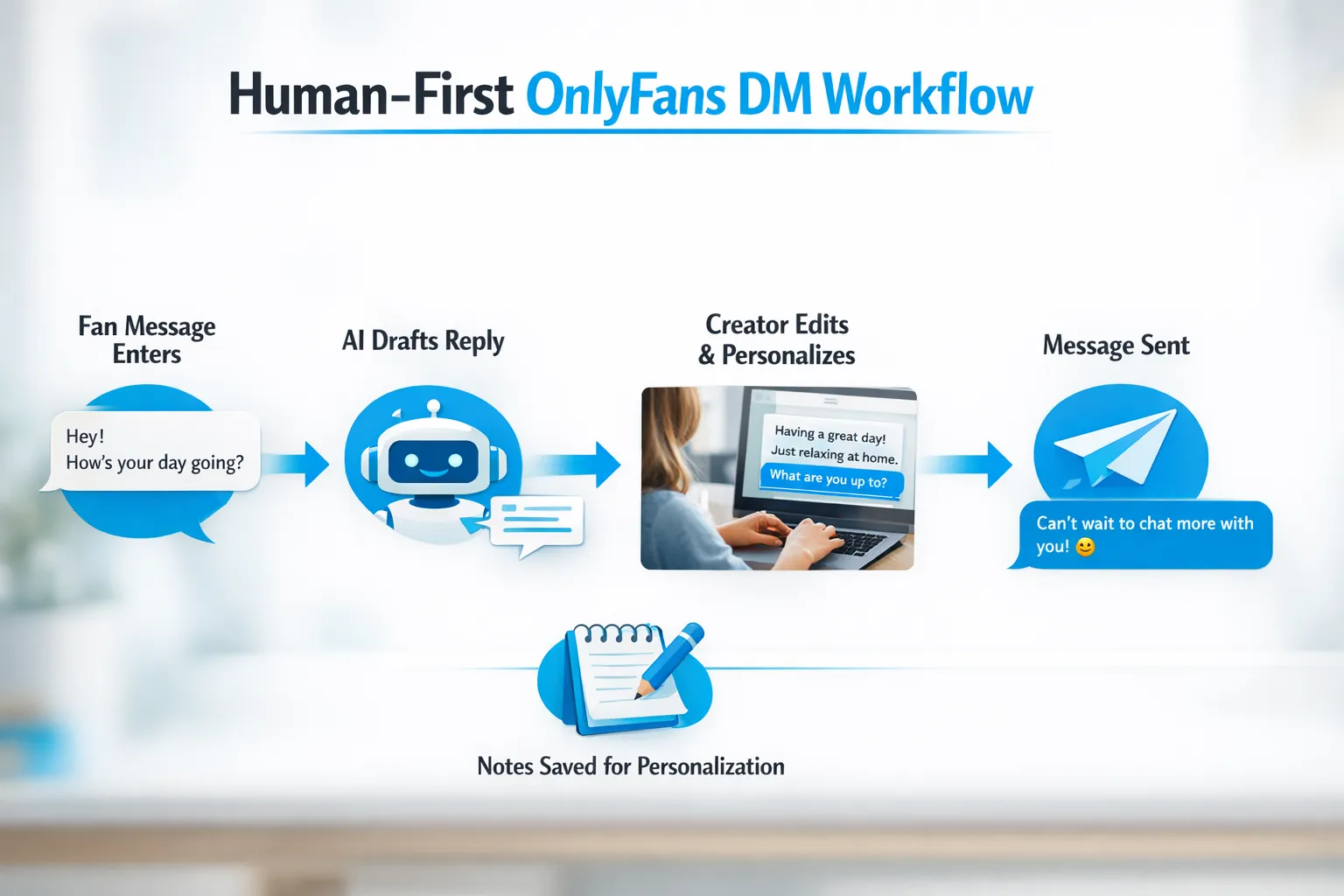
The secret isn’t finding a magic tool. It’s using a repeatable system that forces personalization.
Here’s a simple workflow that works whether you’re solo or supported.
Step 1: Capture context (10 seconds)
Before you open AI, pull the 3 details that matter:
- What did he just say (the real intent)?
- What is his vibe (sweet, dominant, shy, transactional, lonely)?
- What’s the next best action (bond, tip, PPV, custom intake, or end politely)?
Step 2: Ask AI for a draft, not a finished message
You want a draft that you can shape.
Use prompts like:
- “Write 3 reply options, each under 220 characters, flirty but not cringe. Leave brackets for personalization.”
- “Give me a soft upsell that feels natural and respects boundaries.”
Step 3: Add “proof of humanity” (your edit layer)
Before sending, add at least one of:
- A specific callback: “You said you love slow teasing, so…”
- A sensory detail that sounds like you.
- A tiny imperfection that matches your voice (short sentence, playful punctuation, a signature emoji).
Step 4: Log one note (for future money)
Keep one tiny note per spender:
- Their favorite vibe
- Their favorite content type
- One boundary you already clarified
You can do this in a notes app, a spreadsheet, or a simple CRM setup. (If you’re scaling and tracking fans more seriously, you’ll like the system thinking in our OnlyFans tracking links guide, even though that post focuses on traffic, the same “track what matters” mindset applies to DMs.)
DM scenarios where AI helps most (and how to prompt it)
Use this table as your cheat sheet.
| DM situation | What you want to achieve | AI prompt starter | Your required human touch |
|---|---|---|---|
| New subscriber welcome | Set tone + start a path to PPV | “Write a warm welcome message with 2 questions and a playful tease. Keep it classy.” | Add a real question you actually want answered |
| “What do you do for customs?” | Qualify + set boundaries + price anchor | “Write a short custom-intake message with 5 questions and a confident tone.” | Insert your real rules and turnaround time |
| Silent fan re-engage | Bring them back without begging | “Write 3 re-engagement messages: sweet, spicy, and funny. No guilt.” | Reference their last purchase or vibe |
| Price objection | Keep confidence + offer options | “Reply to: ‘too expensive’ with confidence, give 2 options, keep it flirty.” | Decide your real floor (don’t negotiate against yourself) |
| Turn chat into PPV | Tease, then close cleanly | “Write a 2-message sequence: tease then paid offer. No explicit claims.” | Match it to what he asked for and what you actually have |
If you want more non-desperate phrasing for tips and upgrades, read How to get tips on OnlyFans (without sounding desperate).
Copy-paste prompt pack (built for sounding real)
These are designed to avoid the “AI voice” problem.
Prompt: “Sound like me” voice training (safe version)
Paste 3 to 5 of your past messages (remove names and personal details), then use:
“Analyze the tone and writing style of these messages. Create a style guide with:
- sentence length
- favorite words
- emoji usage
- level of explicitness
- how I tease Then write 5 new replies in that exact style for: [PASTE FAN MESSAGE].”
Prompt: Boundaries without killing the mood
“Write a flirty but firm boundary reply to this request: [REQUEST]. Constraints:
- No shaming
- Offer an alternative they can buy
- Under 250 characters
- Ends with a question”
Message templates you can personalize (without sounding like a bot)
Use these as structure, then edit with your voice.
Welcome message (warm, high-converting)
“Hey you 😘 welcome in. Tell me what you’re into, sweet + romantic… or more naughty? And do you like pics, videos, or a little teasing chat?”
Re-engagement (low pressure)
“Okay I have to ask… are you in a quiet mood lately, or should I be distracting you tonight? 😇”
PPV tease that doesn’t feel pushy
“I just made something that’s very your vibe. Want the soft teasing version… or the ‘no patience’ version? 😉”
Custom intake (protects you, saves time)
“I can do that, but I want it to be perfect for you. Quick questions: What vibe do you want (sweet, bratty, dominant)? How long? Any must-have details? Any hard no’s? And when do you want it by?”
Boundaries (firm, still feminine)
“Mmm I get why you’d ask, but I don’t do that. I can do [ALTERNATIVE] though, and I can make it extra personal for you. Want it more slow and teasing, or more intense?”
For a more complete “conversation to sale” flow, use these templates together with the frameworks in our OnlyFans sexting guide.
How to avoid sounding fake (even if you use AI every day)
Fans don’t hate AI, they hate feeling like they’re talking to a script.
These fixes are simple, but they change everything.
Use the “1 unique detail” rule
Every 1:1 message should include at least one unique detail that could not be sent to everyone.
Examples:
- “You said you like lingerie with stockings, I picked something for you.”
- “You always show up late night, are you a night shift guy?”
Keep your messages imperfect on purpose
AI drafts tend to be too polished. Real flirting is not.
- Short sentences are hotter than paragraphs.
- Questions convert better than speeches.
- Sometimes “mm” and “tell me” does more than a 5-line monologue.
Don’t let AI decide your boundaries
Your boundaries are part of your brand. If you let AI improvise them, you can accidentally:
- promise something you don’t want to deliver
- agree to a type of content you don’t make
- create a safety risk
Write your boundary rules once, then reuse them.
Timing matters more than people admit
If you instantly reply with perfect paragraphs every time, it can feel unnatural.
A healthy rhythm:
- Fast when it’s a sale moment
- Slower when it’s casual chatting
- Consistent enough that good spenders feel taken care of
If your DMs are overwhelming because of time zones, volume, or burnout, that’s a sign to consider support rather than “more automation.” (More on that below.)
Choosing AI tools for OnlyFans DMs (what to look for)
Instead of chasing whatever tool is trending, evaluate based on fit.
Tool decision framework
- Privacy controls: can you limit data retention or avoid training? What’s their policy?
- Speed: can it draft multiple short options quickly?
- Tone control: can it follow a style guide without drifting into corporate language?
- Workflow: can you use it on mobile quickly during DM sessions?
- Support for multilingual (if you sell internationally)
Here’s a simple comparison to clarify what you’re buying.
| Tool type | Best for | Main risk | Best practice |
|---|---|---|---|
| General AI chat (drafting) | Fast reply options, objection handling, rewording | Sounds generic if you don’t edit | Always add one unique detail |
| DM-focused assistants | Higher volume drafting, organization | Over-reliance, “template voice” | Use for drafts, keep final edit human |
| Translation AI | Selling internationally | Tone gets weird fast | Translate, then rewrite in your voice |
We also have a broader guide on using AI across your content, marketing, and workflow here: How to use AI to make more money on OnlyFans.
When AI is enough vs when you actually need a human team
AI helps most when:
- You’re doing okay, but you’re tired of repetitive DMs
- You have a clear menu, boundaries, and content vault
- Your main bottleneck is speed and consistency, not strategy
AI is not enough when:
- You’re losing sales because you can’t reply during peak hours
- Your traffic is fine, but conversion in DMs is weak
- You’re scaling and need 24/7 coverage without burning out
- You’re dealing with leaks, impersonators, or privacy threats
At that point, the decision becomes: stay solo, hire chat-only help, or go full-service.
If you’re weighing those options, start with:
- OnlyFans agency vs chatter services: what’s better?
- Working with an agency vs running OnlyFans alone
- 6 red flags before signing with an OnlyFans agency
Frequently Asked Questions
Is it allowed to use AI tools for OnlyFans DMs? Policies can change and depend on how a tool is used. The safest approach is using AI to draft messages, then reviewing and sending them yourself. Always check the latest OnlyFans Terms of Service.
How do I use AI without sounding fake? Use AI for drafts only, then add one unique detail from the conversation, keep replies short, and match your natural texting style. Avoid overly polished paragraphs.
What should I never put into an AI prompt? Don’t paste legal name, address, banking info, login details, contracts, ID data, or anything that could identify you or a fan offline.
Can AI help me sell more PPV in DMs? Yes, it can help you draft teasers, handle objections, and create offer wording faster. The conversion still depends on your timing, personalization, boundaries, and the content you actually deliver.
Should I use AI or hire chat support? Use AI if your main issue is saving time on repetitive typing. Consider human chat support if you need 24/7 coverage, better sales skill, or you’re scaling and protecting your energy.
Want DMs handled professionally (without losing your voice)?
If you’re at the point where DMs are eating your day, AI can help, but it won’t replace a real team that knows how to sell, retain, and protect your boundaries.
Lookstars is a full-service OnlyFans management agency that supports creators with marketing and fan growth, 24/7 chatting, posting strategy, privacy setup (including country blocking), and content leak protection (monitoring and DMCA takedowns). Lookstars also offers no upfront costs, weekly payouts, and flexible cancel-anytime contracts, so you’re not trapped if it’s not a fit.
Learn more about the agency here: Lookstars Agency
Or read the honest breakdown first: Lookstars Agency review: pros, cons, and what to expect
Ready to transform your career?
Join hundreds of creators already earning six figures with Lookstars Agency.
Share this article
Best OnlyFans Agency
Europe's Leading OnlyFans Management Agency.
100% Free Ebook
Get our guide and unlock the secrets to OnlyFans success.
100% Free Ebook
Get our guide and unlock the secrets to OnlyFans success.
Free Revenue Calculator & Profile Analyzer
Try them for freeContinue reading...
Am I Attractive Enough for an OnlyFans Agency? The Answer
Can You Ever Fully Delete Your OnlyFans Content? The Reality