Phone-Only Content Setup: Lighting and Angles That Work
If you’re creating OnlyFans content with just your phone, the biggest “quality upgrade” usually isn’t a new camera. It’s better lighting and smarter angles. ...
If you’re creating OnlyFans content with just your phone, the biggest “quality upgrade” usually isn’t a new camera. It’s better lighting and smarter angles.
The good news is you can get clean, flattering, high-selling photos and videos without a studio, without expensive gear, and without showing more than you want. This guide gives you phone-only setups that are simple, repeatable, and realistic for a creator schedule.
The phone-only rule: light first, angle second
Most “bad quality” phone content is really one of these problems:
- The light is behind you (your phone darkens you to expose the window).
- The light is harsh (overhead bulbs create shadows and texture).
- The camera is too close (wide-angle distortion).
- The phone isn’t stable (micro-shakes = cheaper look).
Fixing these makes your content look more premium, even if you shoot in a bedroom.
Lighting that works (without buying anything)
Setup A: Window light (your best free option)
Best for: selfies, full-body shots, soft “morning” vibe, no-makeup days.
How to do it:
- Stand facing the window, not with the window behind you.
- Move 1–3 feet back from the window (too close can blow out highlights).
- If the light is too sharp, diffuse it with a sheer curtain or even a clean white sheet.
- Turn off overhead lights if they add yellow tones or weird shadows.
Why it works: window light is broad and soft, which smooths skin and makes phone cameras look way better.
Setup B: Window + “bounce” (DIY studio look)
Best for: full-body, body-focused sets, polished lingerie content.
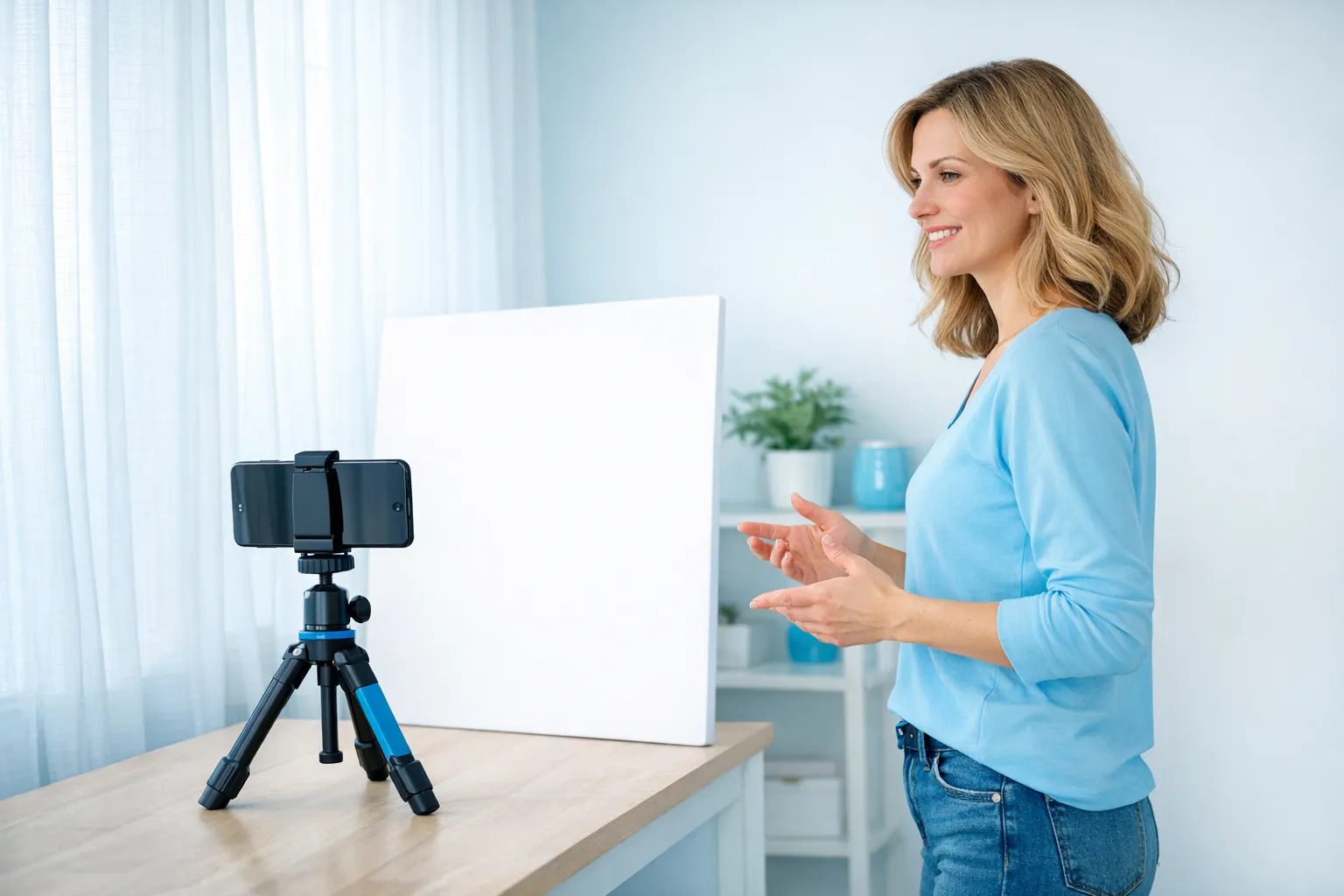
Add one thing: place a white wall, mirror, or poster board opposite the window to bounce light back onto your shadow side.
Quick DIY bounce options:
- White foam board
- A white pillowcase stretched flat
- A large white towel
Setup C: One lamp + diffusion (night shoots)
Best for: nighttime filming, cozy bedroom vibe, “girlfriend” energy.
How to do it:
- Use one bright lamp placed slightly above face height.
- Diffuse it by placing a thin white fabric over the shade or between the lamp and you.
- Don’t mix multiple different bulb colors if you can avoid it.
Safety note: keep fabric away from hot bulbs. If a lamp runs hot, use a safer diffuser method (like bouncing light off a white wall).
Setup D: Bathroom light (only if you control it)
Bathrooms can be amazing or awful.
- If the light is directly overhead, it often creates unflattering shadows.
- If you can add light from the front (even a lamp outside the door shining in), you’ll look much smoother.
Quick comparison table: phone-only lighting setups
| Lighting setup | Best for | What you need | Common mistake | Fast fix |
|---|---|---|---|---|
| Facing a window | Most content types | Window | Window behind you | Turn your body and camera to face the window |
| Window + sheer curtain | Soft skin, “dreamy” look | Curtain/sheet | Too dark after diffusion | Step closer to window or increase exposure |
| Window + bounce | Full-body sets | White board/towel | Bounce too far away | Move bounce closer to your body |
| One lamp (diffused) | Night shoots | Lamp + diffuser | Yellow/orange cast | Turn off other lights, adjust white balance if available |
| Ring/clip light (optional) | Consistent daily shoots | Simple light | Light too close (flat face) | Move it back and slightly above eye line |
Angles that work (and why they work)
Angles are not about tricking anyone. They’re about showing your best features on purpose, and making your content look intentional.
The 3 angle rules that almost always flatter
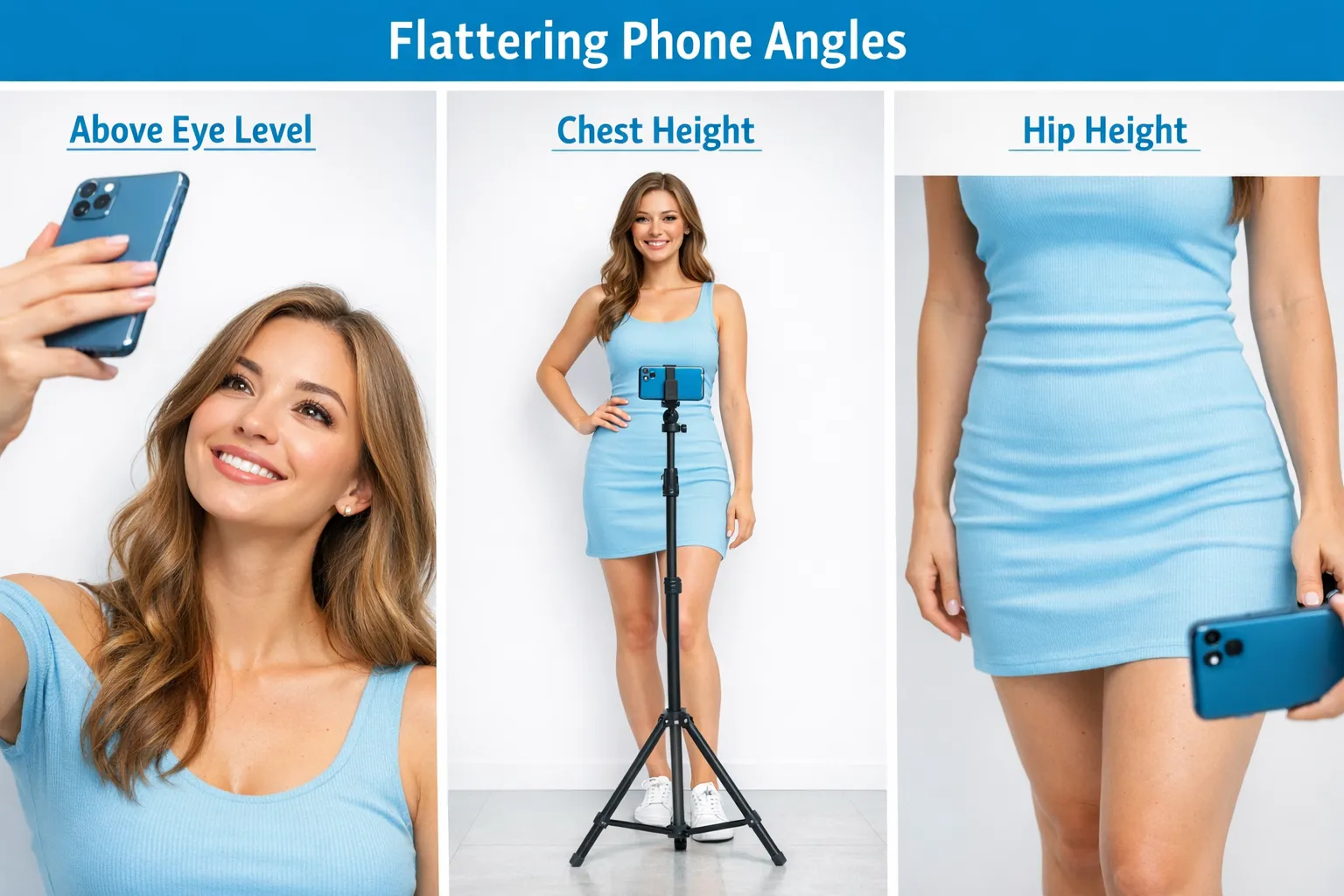
- Get the phone a little higher than you think. Slightly above eye level smooths features and lifts posture.
- Back up, then zoom a bit (instead of shooting close). Being too close with a wide lens can distort your body and face.
- Turn your body 15–45 degrees. Straight-on can look stiff, angled creates shape and “story.”
If you’re a no-face creator, these rules still apply. You just frame from lips down, collarbone down, or use cropping.
Related: if anonymity matters to you, this guide helps you plan content without revealing identity details: How to make money on OnlyFans without showing your face.
Phone placement: the “tripod is optional” stability hacks
You do not need fancy equipment, but you do need stability.
Easy phone supports:
- A stack of books on a dresser
- A mug turned sideways (as a cradle)
- A shelf at chest height
- A cheap phone tripod (nice, but not required)
Stability matters because it makes your footage look more premium, especially for PPV clips.
Angle playbook (copy this for different shoot types)
1) Selfies that sell (face or no-face)
- Phone height: slightly above eye level
- Light: facing a window or front-facing lamp
- Pose cue: shoulders relaxed, chin slightly forward (not down)
No-face twist: crop at lips, use hair to cover, or frame neck-to-hips. Always check mirrors and reflective objects in the background.
2) Full-body shots (lingerie, outfits, teaser sets)
- Phone height: around chest height (too high can shorten legs)
- Distance: farther back than you think
- Light: window + bounce if possible
Pro tip: if your phone has multiple lenses, avoid ultra-wide (0.5x) for full-body unless you want a stylized look. Ultra-wide can warp edges.
3) Booty/legs focus (faceless-friendly)
- Phone height: hip height or slightly lower
- Light: from the side/front, not directly from above
- Pose cue: shift weight to one leg, slight arch, turn hips
This angle is popular because it feels POV-like without needing explicit framing.
4) Bed content (cozy, intimate vibe)
- Phone height: slightly above you (on a nightstand or stacked books)
- Light: window light from the side, or diffused lamp
- Avoid: overhead ceiling light, it creates harsh shadows
5) Shower/bath content (high risk, high reward)
This can look luxurious, but be careful.
- Keep your phone safe and stable, away from water.
- Use bright, diffused light (bathrooms are often dim).
- Watch reflections (tiles, mirrors, glass).
The “one-room upgrade”: control your background
A phone camera will expose clutter fast.
Do a 60-second reset:
- Remove laundry, bags, anything with labels or personal info
- Choose one “clean wall” angle
- Add one simple prop (robe, blanket, chair) to make it feel styled
Privacy note: backgrounds can reveal you (mail, school items, work logos, unique decor). If staying anonymous is part of your plan, treat background like a security risk.
If you’re also promoting anonymously, this pairs well with: How to secretly promote your OnlyFans (without friends or family finding out).
Phone settings that actually matter (keep it simple)
You don’t need to become a camera nerd. Just do these:
- Clean your lens (seriously, it’s the fastest quality boost).
- Use the back camera when possible (usually better quality).
- Tap to focus and lock exposure if your phone allows it.
- Avoid heavy in-app filters that crush detail. If you edit, keep it consistent.
If your content looks grainy: your phone is struggling in low light. Add light first, don’t try to “fix it in editing.”
A 45-minute phone-only shoot plan (beginner friendly)
This is how to get consistent content without burning out.
- Choose one lighting setup (window, or lamp).
- Record 3 short clips (10–20 seconds each): close-up tease, mid-shot, full-body.
- Shoot 12 photos total:
- 4 selfies or upper-body
- 4 mid-body angles
- 4 full-body or niche-focused shots
- Change one thing only (top, robe, hairstyle, angle) and repeat 6 more photos.
- Stop. Don’t over-shoot. Save energy for DMs and promotion.
If you want help deciding what to post vs what to sell, use this as your next read: Best OnlyFans content ideas (what to post) in 2025.
Troubleshooting: quick fixes for common lighting and angle issues
“My skin looks textured and harsh”
- Cause: hard light (direct bulb, overhead light)
- Fix: diffuse the light, face a window, or bounce light with something white
“My videos look cheap even though I have a good phone”
- Cause: shaky footage + low light
- Fix: stabilize your phone and add more light
“The room looks yellow or weird”
- Cause: mixed lighting (window + warm lamp)
- Fix: turn off one source and stick to a single light temperature
“My body looks distorted”
- Cause: camera too close, wide lens
- Fix: step back and use a normal lens, then crop if needed
When phone-only is not enough (and what to do)
Phone-only can take you very far. But if you’re consistently running into one of these, it might be time to upgrade one piece:
- You shoot mostly at night and can’t get clean footage
- You film lots of full-body content and need stable, repeatable framing
- You want to stream and need consistent lighting for longer sessions
If live streaming is part of your plan, this guide covers the full setup: How to stream on OnlyFans Live like a pro.
Frequently Asked Questions
Do I need a ring light for a phone-only content setup? Not necessarily. A window setup can look more natural and often more flattering. A ring light helps if you shoot at night or want consistent lighting anytime.
What’s the best phone camera angle for full-body content? Usually chest height with the phone a few steps back, using soft front light. Too high can shorten your legs, too low can distort proportions.
How do I look better on camera without heavy editing? Use softer light (window or diffused lamp), stabilize your phone, and avoid shooting too close with a wide lens. Those three changes do more than most filters.
How can I stay anonymous while filming on my phone? Frame intentionally (no-face angles), keep backgrounds clean of identifying details, watch reflections, and use privacy tools like blocking regions where appropriate. For a full checklist, see this anonymity guide.
Want a team to turn your content into a consistent income system?
A clean phone-only setup solves quality. Scaling usually comes from everything around it, content planning, posting strategy, promotion, 24/7 fan engagement, and protecting your privacy.
If you’re ready to stop doing everything alone, you can learn about working with support here: Working with an agency vs running OnlyFans alone. And if you want professional management, you can apply directly through Lookstars Agency.
Ready to transform your career?
Join hundreds of creators already earning six figures with Lookstars Agency.
Share this article
Best OnlyFans Agency
Europe's Leading OnlyFans Management Agency.

100% Free Ebook
Get our guide and unlock the secrets to OnlyFans success.
100% Free Ebook
Get our guide and unlock the secrets to OnlyFans success.
Free Revenue Calculator & Profile Analyzer
Try them for freeContinue reading...
Am I Attractive Enough for an OnlyFans Agency? The Answer
Can You Ever Fully Delete Your OnlyFans Content? The Reality