OnlyFans Release Form - Everything You Need to Know (2026 Guide)
Collabs can be one of the fastest ways to grow on OnlyFans, but they’re also one of the easiest ways to accidentally put your account (and your partner’s pri...
Collabs can be one of the fastest ways to grow on OnlyFans, but they’re also one of the easiest ways to accidentally put your account (and your partner’s privacy) at risk.
If you’ve been searching “OnlyFans release form”, you’re probably in one of these situations:
- You want to post content with a boyfriend/girlfriend, spouse, or casual partner.
- You’re planning a creator collab, swap, or scene.
- You’re faceless and trying to keep your real life protected.
- You’re working with an agency and want to make sure your paperwork is clean.
This guide explains what an OnlyFans release form is, when you typically need one, how to handle it safely, and what to do if a collaborator refuses (or disappears).
Disclaimer: This is educational, not legal advice. Platform policies and local laws can change. Always verify requirements in official OnlyFans documentation (including the OnlyFans Terms of Service) and consult a qualified professional if you’re unsure.
What is an OnlyFans release form (in plain English)?
An OnlyFans release form is documentation that confirms:
- The person appearing in your content is a consenting adult.
- They agree to be filmed/photographed and to have that content distributed on OnlyFans.
- Their identity can be verified (typically through ID and platform checks).
Creators usually run into release forms when the second person:
- Is not a verified OnlyFans creator on your account, and
- Will appear in content you plan to upload.
Think of it as your “paper trail.” It protects the platform, and it also protects you by proving consent and adulthood.
Release form vs tagging a verified creator: which is better?
In many cases, the cleanest option is collaborating with someone who is already verified as a creator on the platform, because the verification and identity link are already established.
A release form is often used when:
- Your partner does not want an OnlyFans account.
- Your collaborator wants privacy and does not want their creator profile public.
- You’re filming in a “real couple” context, but only one of you runs the account.
Here’s a simple decision table to help you choose the safest route.
| Situation | Usually the safest approach | Why it matters |
|---|---|---|
| Collab with another established creator | Collaborate as two verified creators (and follow the platform’s collaboration rules) | Lower paperwork risk, clearer consent trail |
| Partner is not a creator and wants privacy | Use the platform’s release form workflow (and keep records) | You need documented consent and age verification |
| Someone appears briefly (hands, oral, background, reflection) | Treat it as “appearing” and avoid uploading until you’re compliant | “Accidental appearance” is still appearance |
| You cannot get consent and verification | Do not film or do not post | Your account is not worth the risk |
If you’re creating couple content, you may also like: Complete OnlyFans Couples Guide: How To Make Money as a Couple
When do you typically need an OnlyFans release form?
Creators usually need a release form when anyone identifiable appears in content you post.
“Identifiable” is broader than most people think. It can include:
- Face
- Tattoos or distinctive birthmarks
- Voice
- Unique jewelry that fans recognize
- Reflections in mirrors
- Background appearances
If you’re faceless, this matters even more, because your brand is already built around controlled visibility. A “tiny” cameo can turn into a huge compliance headache.
What a release form is NOT (common misconceptions)
Let’s clear up the biggest myths.
It is not a relationship contract
A release form is about consent to appear in content, not about who “owns” your relationship, who keeps the money, or what happens after a breakup.
It is not leak protection
Even with a perfect release form, content can still leak.
If leaks are a big fear for you, focus on operational protection too (monitoring, takedowns, proactive privacy setup). Lookstars has a practical privacy-focused guide here: How to Secretly Promote Your OnlyFans (Without Friends or Family Finding Out)
It is not a guarantee your account is safe
OnlyFans can still enforce policies if something else is off (improper verification, prohibited content, suspicious activity, etc.). Your goal is to reduce risk, not “bulletproof” your account.
The release-form moment that gets creators in trouble
Most problems happen because creators film first, and handle paperwork later.
That’s understandable (the vibe is good, time is limited, you don’t want to “ruin the moment”), but it creates real risk:
- You post without documentation.
- You get flagged.
- Your account gets restricted.
- You lose income while scrambling to fix it.
A safer mindset is: paperwork first, content second.
A safe OnlyFans release form workflow (before, during, after the shoot)
Below is a creator-friendly workflow you can actually follow without turning your life into a legal office.
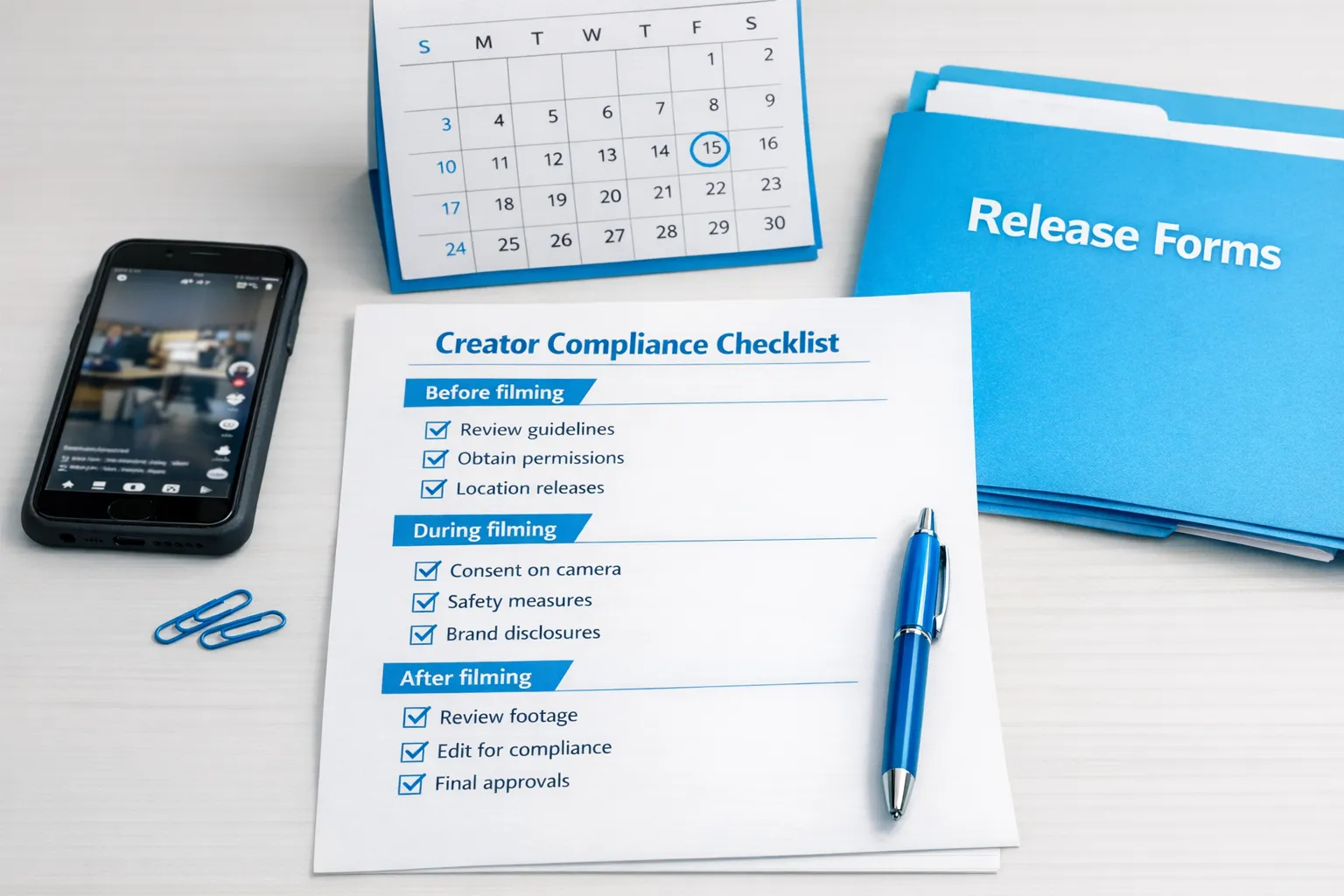
Before filming: the “no-regrets” checklist
- Confirm your collaborator is a consenting adult and comfortable being recorded.
- Discuss boundaries (what is allowed, what is off-limits, what stays private).
- Decide the compliance path:
- Both verified creators, or
- Release form for the non-creator partner.
- Decide how you’ll store the documentation (secure folder, not your camera roll).
- Agree on what happens if you break up or stop collaborating (especially for couple accounts).
If you work with an agency or any third party, add one more layer:
- Confirm who has account access and who will upload the form.
- Confirm where documents are stored and who can access them.
(If you’re evaluating outside help, this breakdown can help you decide what to outsource): Working With an Agency vs Running OnlyFans Alone
During filming: keep it clean
- Avoid capturing anyone else in the background (roommates, friends, TVs, reflections).
- If privacy matters, reduce identifying details (distinctive tattoos, family photos on the wall, mail on a desk).
- If your collaborator wants extra privacy, consider angles that minimize identifiable features.
After filming: upload only when you’re compliant
- Do not post “just a teaser” if it still shows the person.
- Keep a clear file naming system for collabs.
- Save the raw footage until you’re sure everything is accepted and stable.
What to ask your collaborator before they sign anything
A release form is a trust moment. If you handle it awkwardly, people get spooked.
Use a calm, professional tone and explain the “why”:
- “OnlyFans requires documentation for anyone who appears in content.”
- “It protects both of us and helps keep my account safe.”
- “It does not give me ownership of you, it’s just consent and age verification.”
Copy/paste message template (partner or collab)
“Hey love, quick admin thing before we film. OnlyFans requires a release form or creator verification for anyone who appears in content. It’s basically proof of consent + that you’re an adult, so my account stays safe. If you’re not comfortable with it, we can skip filming or we can shoot content where you’re not identifiable. Totally your call.”
This keeps it respectful and gives them an easy out.
Red flags: when you should NOT post the collab
If any of these happen, pause.
- They want to be in content but refuse any verification or paperwork.
- They pressure you to “just upload it” and deal with it later.
- They are intoxicated or can’t clearly consent.
- They are okay filming, but not okay with distribution (that mismatch becomes a disaster later).
If you’re already working with management, this is also where bad actors show themselves. Any manager or agency that encourages risky uploads is not protecting you.
For more safety vetting: 6 Red Flags to Watch Out for Before Signing with an OnlyFans Agency
Practical privacy tips specific to release forms
Creators often worry: “If someone signs a release form, will my partner’s name be exposed?”
OnlyFans’ internal handling can change, and you should verify in official docs, but here’s the practical approach that reduces risk regardless of platform UI:
- Treat release form data as sensitive personal data.
- Do not store IDs in your camera roll or unprotected albums.
- Use a dedicated secure storage method (encrypted drive, password manager secure notes, or a locked folder).
- Limit who has access (especially if you work with a team).
If you’re faceless or building anonymously, you’ll also want broader identity hygiene, not just paperwork. This guide helps: How to Make Money on OnlyFans without Showing Your Face & Stay Anonymous
What if your collaborator disappears, breaks up with you, or changes their mind?
This is the part nobody wants to think about, but it’s the part that keeps creators safe.
Scenario A: You haven’t posted yet
If you don’t have the required documentation and they are no longer cooperative, the safest move is simple: do not post the content.
Scenario B: You already posted
At that point, your priorities become:
- Reduce account risk (compliance first).
- Reduce personal conflict (keep communication calm and documented).
- Stop future uploads involving them.
If you’re in a messy situation, it can help to talk to a professional who’s used to handling creator operations calmly.
How agencies should handle release forms (what to demand)
If you’re working with an OnlyFans management agency, you should be able to get clear answers to these questions:
- Who collects the release forms and confirms compliance before posting?
- Where are documents stored, and who can access them?
- What happens if a collaborator is unwilling to complete the process?
- What is the policy for deleting content if a collab ends?
If an agency dodges these questions, that’s a trust issue.
You can also compare management models here: OnlyFans Agency vs Chatter Services: What’s Better?
The “Collab Safety Pack”: quick checklist you can screenshot
Use this every time you film with another person.
- Confirm consent (clear, enthusiastic, sober).
- Confirm adulthood and platform compliance path (verified creator vs release form).
- Confirm boundaries and allowed content.
- Remove identifying background items (mail, photos, reflections).
- Store documentation securely.
- Do not upload any content until compliance is complete.
- Keep a simple record: date, collaborator stage name, what was filmed.
If you want help managing compliance, privacy, and growth
Release forms are one piece of running your OnlyFans like a business. The bigger picture is:
- Growing traffic consistently
- Converting subs through DM strategy
- Protecting privacy (country blocking, security setup)
- Monitoring leaks and handling takedowns
- Staying organized so your account is stable
If you want to focus on content while a team handles operations, take a look at Lookstars: Lookstars OnlyFans Agency. You can also read a transparent breakdown of tradeoffs here: Lookstars Agency Review: Honest Pros, Cons & Results

Ready to transform your career?
Join hundreds of creators already earning six figures with Lookstars Agency.
Share this article
Best OnlyFans Agency
Europe's Leading OnlyFans Management Agency.
100% Free Ebook
Get our guide and unlock the secrets to OnlyFans success.
100% Free Ebook
Get our guide and unlock the secrets to OnlyFans success.
Free Revenue Calculator & Profile Analyzer
Try them for freeContinue reading...

Am I Attractive Enough for an OnlyFans Agency? The Answer

Can You Ever Fully Delete Your OnlyFans Content? The Reality
