OnlyFans DMCA: How to Remove Stolen Content and Protect Your Work as a Creator
Content theft is one of the most frustrating parts of being an OnlyFans creator. You put time (and money) into shooting, editing, and building a relationship...
Content theft is one of the most frustrating parts of being an OnlyFans creator. You put time (and money) into shooting, editing, and building a relationship with fans, then someone reposts your work on a random tube site or “leak” forum in minutes.
The good news: you are not powerless. You can use OnlyFans DMCA takedowns (and a few smart prevention habits) to reduce how far your content spreads and protect your income long term.
This guide is educational, not legal advice. Laws and platform policies can change. If you’re unsure, verify in official docs or talk to an attorney.
What “DMCA” actually means (in creator language)
DMCA stands for the Digital Millennium Copyright Act, a US law that created a formal process for copyright owners to request removal of infringing content from online services.
For creators, “DMCA” usually means one of these actions:
- Sending a takedown notice to a website, host, social platform, or search engine that’s displaying your stolen photos/videos.
- The platform removes the content (or restricts access) to keep its legal safe-harbor protections.
- The uploader can submit a counter-notice if they claim it’s not infringement. If that happens, the platform may restore the content unless the copyright owner escalates (the exact flow depends on the service and jurisdiction).
If you want to see the legal requirements in plain text, the US Copyright Office has an overview of the DMCA process and agent system on its site: U.S. Copyright Office DMCA info.
The reality check: DMCA is effective, but it’s not magic
DMCA is best at:
- Getting specific URLs removed from specific sites
- Getting reposts removed from mainstream platforms
- Getting Google results de-indexed (so people stop finding the leaks as easily)
DMCA is not great at:
- Completely eliminating your content from the internet forever
- Stopping the same files from being re-uploaded somewhere else (it can feel like whack-a-mole)
Your goal is to reduce visibility, reduce distribution, and reduce repeat leaks, not to chase perfection.
Step 1: Before you file anything, collect the right evidence (10 minutes)
When creators get ignored, it’s usually because the report is missing key info. Do this first.
Evidence checklist (copy this)
- Save the exact URL(s) where the stolen content appears
- Take screenshots showing the content and the page URL (include date/time if possible)
- Write down what the content is (example: “Video posted on my OnlyFans on Jan 10, 2026”)
- Save proof you own it (original file, edit project, or the original OnlyFans post link)
- Note whether it’s a full reupload, a clip, a screenshot, or a “preview”
If you’re faceless or privacy-first, do not log into sketchy sites with personal accounts. Just document and move on.
Step 2: Identify who you should send the takedown to (the fastest path)
Creators often waste time emailing the pirate site owner (who ignores you). The fastest route is usually the service provider that can actually remove the page.
Here’s a practical map.
| Where you found the leak | Best first target | Why it works | What you’ll need |
|---|---|---|---|
| A big social platform (X, Reddit, etc.) | The platform’s copyright report flow | They have a defined process and teams | URL + proof you own it |
| A random leak site | The site’s host or abuse contact (and sometimes the domain registrar) | Hosts can suspend or remove infringing pages | URLs + a compliant notice |
| Google search results | Google removal request for copyright | Reduces discovery even if the page stays up | URLs of infringing pages |
| Telegram/Discord-style shares | The platform’s reporting flow | Some remove repeat infringers | Message links + screenshots |
Two useful tools when you can’t tell who’s hosting a site:
- A WHOIS lookup (registrar info)
- A hosting lookup
(You don’t need to be technical, you just need to find an “abuse” contact that takes DMCA seriously.)
Step 3: Write a DMCA notice that actually gets processed
Under US law, a DMCA notice typically needs specific statements and identifiers. If you omit them, some services will reject it automatically.
A DMCA notice generally includes:
- Your contact info
- Identification of the copyrighted work
- Identification of the infringing material (specific URLs)
- A good faith statement
- A statement under penalty of perjury that the info is accurate
- Your signature (typed is often accepted)
For the statutory elements, you can cross-check 17 U.S.C. §512(c)(3). Cornell Law School’s Legal Information Institute hosts the text: 17 U.S. Code § 512.
DMCA takedown template (creator-friendly)
You can copy/paste this and adjust.
Subject: DMCA Takedown Notice (Copyright Infringement)
Hello,
I am the copyright owner (or authorized to act on behalf of the copyright owner) of the content described below.
-
Copyrighted work: Original photo/video content created by me and published on my OnlyFans account.
-
Infringing material (URLs):
- [paste URL 1]
- [paste URL 2]
- [paste URL 3]
- Location of original (optional but helpful):
- [link to your OnlyFans post, or describe where it appears]
-
Good faith statement: I have a good faith belief that the use of the material described above is not authorized by the copyright owner, its agent, or the law.
-
Accuracy and authority statement (penalty of perjury): I swear, under penalty of perjury, that the information in this notice is accurate and that I am the copyright owner or am authorized to act on behalf of the copyright owner.
-
Electronic signature: /[Your legal name]/
Contact information: Name: [legal name] Email: [email] Address: [address or business address if applicable] Phone: [phone]
Thank you, [Your name]
Privacy note: If you don’t want to expose your home address, consider using a business address (for example, a PO box) where legally appropriate. Some creators also form an LLC for separation, but it’s not required for DMCA.
If you’re curious about the LLC angle from a creator perspective, this internal guide is a good starting point: LLC for OnlyFans: When It Makes Sense.
Step 4: De-index the leak so it stops showing up in search
Even if a pirate page stays online, removing it from search results can cut the damage dramatically because most casual viewers discover leaks through Google.
Start here:
- Google’s copyright removal flow: Google copyright removal
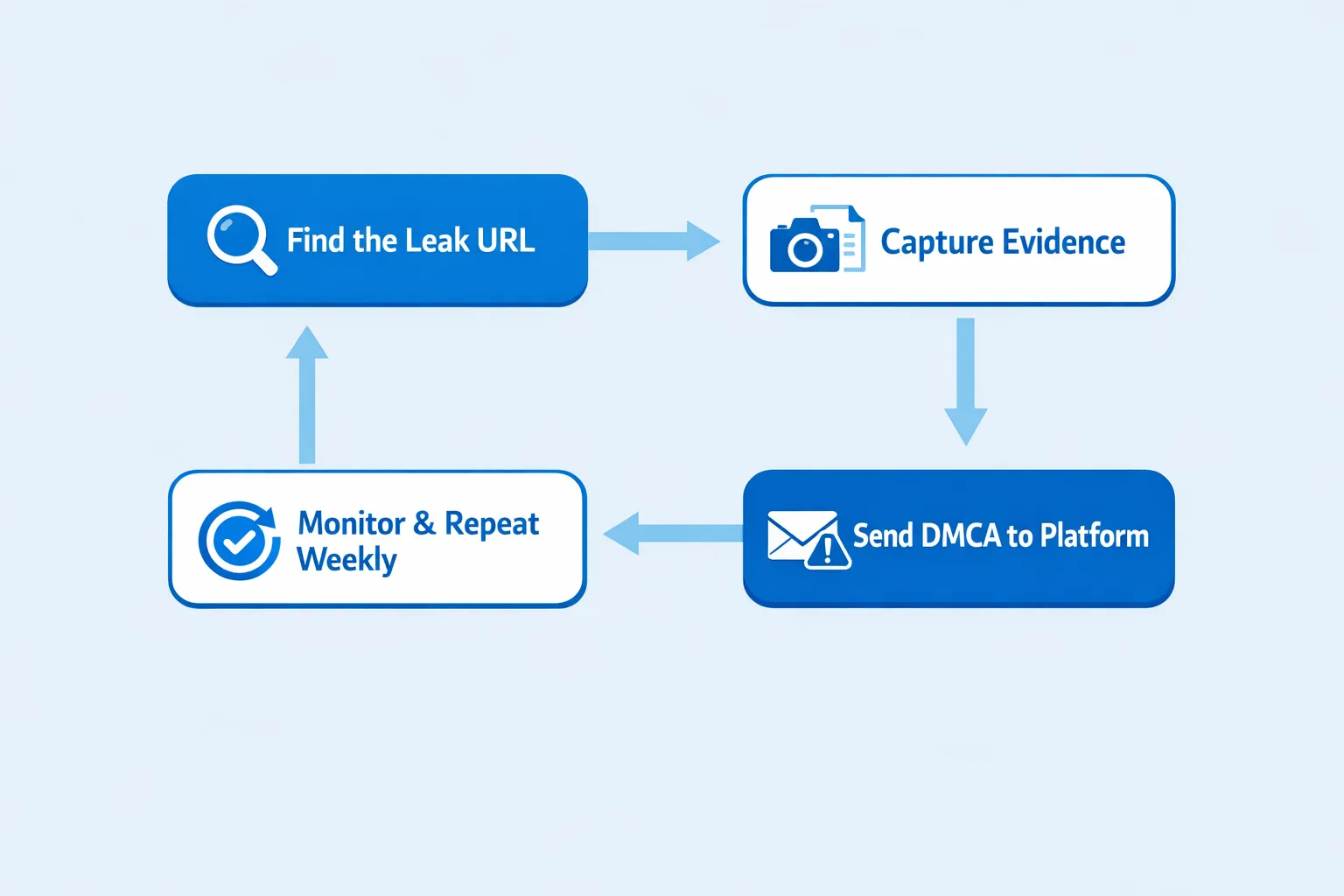
Tip: Keep a simple spreadsheet with columns for (URL, site, date submitted, status, follow-up date). When you’re stressed, a tracking system prevents you from redoing work.
Step 5: Follow up like a pro (without burning out)
Most creators quit too early, or they rage-email the pirate site. A calmer system works better.
A realistic follow-up rhythm
- Day 0: Submit takedown to platform/host and submit Google de-index request.
- Day 3–5: If nothing moves, re-send to the correct abuse contact with the subject line “Follow-up: DMCA Notice.”
- Day 7–14: If ignored, escalate to hosting provider or registrar (if relevant), and re-check whether the URL changed.
Also: re-uploaders often post the same content under new URLs. When that happens, you need to report the new URL.
Step 6: Protect future content (so you’re not filing DMCA every week)
DMCA is reactive. What you want is a prevention stack that makes stealing harder, makes stolen content less valuable, and reduces discovery.
The creator leak-protection stack (practical, not paranoid)
| Protection step | What it helps with | Tradeoff / downside |
|---|---|---|
| Strong watermark (your stage name + @handle) | Reduces resale value, helps prove ownership | Some fans dislike visible marks |
| Post teasers in lower resolution, keep premium in DMs/PPV | Limits what’s worth leaking | Requires a clear PPV strategy |
| Use OnlyFans privacy settings like country blocking | Reduces local exposure risk | Doesn’t stop global reuploads |
| Don’t reuse the exact same set across every platform | Makes reverse-search linking harder | More planning and batching |
| Weekly leak check (reverse image search + key phrase search) | Finds leaks early | Takes time unless outsourced |
If privacy is your biggest concern, you’ll also want a clean separation between “real life” and creator identity (emails, usernames, socials). This internal guide goes deeper: How to Secretly Promote Your OnlyFans (Without Friends or Family Finding Out).
A quick “what to do today” checklist
- Turn on country blocking for the places you most need privacy from.
- Add a simple watermark to new content going forward.
- Create a “leak tracker” note or spreadsheet.
- Pick one weekly time (15 minutes) to search your stage name + “leak,” and reverse-search 1–2 top images.
Step 7: Know when to DIY vs get help (decision framework)
Some creators can handle takedowns alone. Others should not be spending their energy on it, especially if you’re scaling and DMs/content are already a full-time job.
Here’s a grounded way to decide.
DIY vs specialist vs full management
| Option | Makes sense when | Risks / watch-outs |
|---|---|---|
| DIY takedowns | You have a small number of leaks and time to track them | Easy to burn out, inconsistent monitoring |
| Hire a leak-focused specialist/service | You’re seeing frequent reuploads, multiple sites, or SEO spread | Vet carefully, avoid anyone asking for unsafe account access |
| Work with a full-service OnlyFans management agency | Leaks are one of multiple bottlenecks (growth, DMs, posting, ops) | You must trust the team, contracts matter |
If you’re also evaluating broader support (chatting, marketing, operations), this internal comparison can help you think clearly: Working With an Agency vs Running OnlyFans Alone.
How Lookstars approaches content leak protection (and what to clarify with any agency)
Lookstars is an OnlyFans management agency, and one of the services they list is content leak protection, including monitoring and DMCA takedowns, plus privacy setup like country blocking.
If you’re considering delegating leak protection to any OnlyFans agency (Lookstars or someone else), ask these questions before you say yes:
- What exactly do you monitor? (Google results, specific leak forums, reupload patterns)
- How fast do you submit takedowns, and how do you track them?
- Do you file removals only, or also handle de-indexing requests?
- What do you need from me? (Never accept vague answers about credentials or access.)
- How do you protect my identity during takedowns?
If you’re currently in “research mode,” you might also want to read: 6 Red Flags to Watch Out for Before Signing with an OnlyFans Agency.
And if you want to see what Lookstars offers at a high level (marketing, 24/7 chat, posting, privacy, leak protection) you can start here: Lookstars Agency.
If you’re overwhelmed, use this 48-hour plan
When leaks hit, it’s easy to spiral. This plan keeps you moving without wrecking your mental health.
In the next 2 hours
- Save URLs and screenshots.
- Submit takedowns to the most visible sources first (social platforms, major sites).
- Submit Google de-index requests for the top URLs.
In the next 48 hours
- Set up your tracking sheet.
- Add watermarking to future content.
- Tighten privacy (country blocking, separate creator contact details).
In the next 7 days
- Do one scheduled leak scan.
- Decide if leak protection is now a “system” you manage, or a task you outsource.
Leaks are scary, but they don’t have to define your career. When you handle them with a repeatable process, you get your power back, and you keep building.
Ready to transform your career?
Join hundreds of creators already earning six figures with Lookstars Agency.
Share this article
Best OnlyFans Agency
Europe's Leading OnlyFans Management Agency.
100% Free Ebook
Get our guide and unlock the secrets to OnlyFans success.
100% Free Ebook
Get our guide and unlock the secrets to OnlyFans success.
Free Revenue Calculator & Profile Analyzer
Try them for freeContinue reading...
Am I Attractive Enough for an OnlyFans Agency? The Answer
Can You Ever Fully Delete Your OnlyFans Content? The Reality