Is OnlyFans Safe for Creators? Privacy Risks & Safety Tips
“Safe” on OnlyFans does not mean “risk-free.” It means you understand what can go wrong, you reduce your exposure with smart systems, and you have a plan for...
“Safe” on OnlyFans does not mean “risk-free.” It means you understand what can go wrong, you reduce your exposure with smart systems, and you have a plan for when something does go wrong.
For most creators, the real risks are not the platform itself. They’re the privacy and security gaps around it: reused usernames, identifiable backgrounds, weak account security, leaky promo funnels, and slow response when content gets reposted.
This guide breaks down the most common privacy risks, what actually causes them, and the practical safety tips you can implement today.
What “OnlyFans safe” realistically means
OnlyFans can be a safer environment than many open social platforms because access is paywalled and you control who can subscribe (and block). But creators still face predictable safety categories:
- Privacy risk: your identity gets linked to your creator persona (doxxing).
- Content risk: your media gets leaked, reposted, or used without consent.
- Account risk: hacking, SIM swap, phishing, or takeovers.
- Harassment risk: stalking, threats, extortion scams, or coordinated harassment.
- Operational risk: poor boundaries, burnout, and pressure to over-share.
If you treat OnlyFans like a business with a security routine, you can reduce these risks significantly.
The most common privacy risks for creators (and how they happen)
Creators often assume the biggest risk is “OnlyFans leaks.” In reality, leaks are only one piece. The most damaging issues usually come from identity linkage and inconsistent digital hygiene.
Privacy and safety risk map
| Risk | How it usually happens | Why it matters | Practical mitigation |
|---|---|---|---|
| Identity linkage (doxxing) | Reused usernames, same selfies across platforms, recognizable room details, location clues, old accounts connected to your phone number | Family, coworkers, or locals connect your stage name to your real identity | Separate accounts and identifiers, remove metadata, avoid identifiable backgrounds, use a dedicated email/number |
| Content leaks | Subscribers repost, screen-record, upload to leak forums, or re-sell packs | Long-term reputation risk, emotional stress, revenue dilution | Watermarking, rapid monitoring, DMCA takedowns, limit identifying marks in content |
| Account takeover | Weak passwords, reused passwords, no 2FA, phishing, SIM swap | Loss of income, private messages exposed, impersonation | Password manager, 2FA, secure email, device hardening |
| Harassment and stalking | Public promo attracts bad actors, “where are you from?” probing, doxxing attempts | Personal safety risk, emotional toll | Strong boundaries, blocking, moderation, never “prove” anything personal |
| Financial exposure | Using personal email in payment apps, sharing payout details, mixing business and personal banking | Identity linkage and admin headaches | Separate finances where possible, keep details private, avoid sharing payout screenshots |
Note: platform policies and safety tools can change over time. Always verify current options in official OnlyFans documentation.
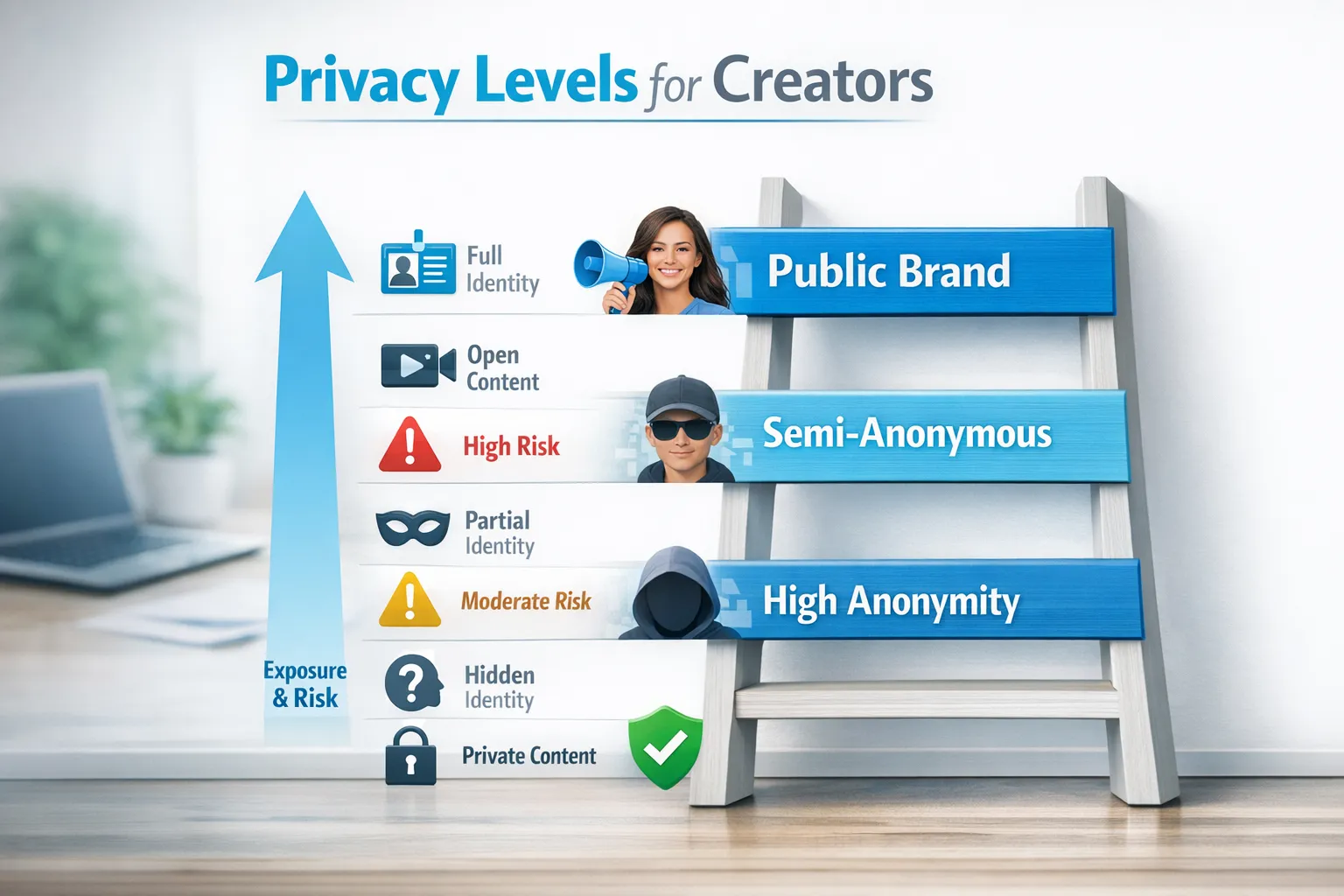
A simple decision framework: pick your exposure level before you post
Most safety problems happen because a creator is operating like they’re anonymous, while their setup is actually public.
Pick an exposure level intentionally, then build your content and promo around it.
Three common creator privacy modes
| Mode | What it looks like | Upside | Tradeoffs | Who it fits |
|---|---|---|---|---|
| Public brand | You show face, use your real first name (or a recognizable identity), cross-promote everywhere | Fast trust-building and easier branding | Highest doxxing risk, can impact future employment and personal life | Creators comfortable being public long-term |
| Semi-anonymous | Stage name, controlled face visibility, limited personal details, careful promo | Strong balance of growth and privacy | Requires discipline, mistakes add up | Many full-time creators who want privacy boundaries |
| High-anonymity (faceless) | No face, no identifying marks, strict separation from personal life | Best privacy protection | More planning and consistent “persona” building | Creators with strict privacy needs (family, career, local community) |
There is no morally “right” choice here. The safest strategy is the one you can maintain consistently.
OnlyFans safety tips you can implement today (practical checklist)
Below is a creator-friendly checklist you can work through in 60 to 120 minutes. It covers the gaps that most often lead to privacy scares.
1) Lock down account security (the boring part that saves you later)
Start here because everything else fails if your account or email gets compromised.
- Use a password manager and create a unique password for OnlyFans and your creator email.
- Turn on 2FA anywhere you can (OnlyFans, email, social accounts).
- Secure your creator email (unique password, 2FA, recovery methods you control).
- Avoid SMS-only security when possible. SIM swaps happen, so app-based authentication is often safer.
- Separate devices if you can (even a dedicated “creator phone” helps). If not, create a clean user profile and tighten app permissions.
If someone asks you for codes, “verification screenshots,” or a login test, assume it’s a scam. Legit partners do not need your 2FA codes.
2) Build identity separation (so your stage name stays a stage name)
Identity linkage is usually accidental.
- Create a new email used only for creator work.
- Use a dedicated phone number for creator accounts if possible.
- Never reuse usernames from personal accounts, gaming tags, old Reddit handles, or TikTok names.
- Avoid linking personal contacts when apps ask to “find friends.” Those prompts can connect worlds you meant to keep separate.
- Be consistent with your stage persona (age-appropriate, non-identifying details, no hometown, no employer hints).
If you want maximum privacy, consider what you reveal in “harmless” details: local slang, sports teams, school colors in the background, unique tattoos, even distinctive wall art.
3) Clean your content for hidden identifiers
Creators often focus on what’s in the frame, but forget what’s embedded in the file.
- Remove metadata (EXIF) from photos and videos before posting anywhere outside OnlyFans.
- Watch reflections (mirrors, windows, TV screens), and check for mail, packaging labels, or documents in the background.
- Avoid filming with location clues (street signs, unique skyline views, gym logos).
- Be careful with audio (distinctive voices, names in the background, notification sounds).
A good habit is a 10-second “privacy scan” before you upload: corners of the frame, reflections, and background noise.
4) Use watermarks strategically (to slow down lazy re-uploaders)
Watermarks do not stop determined leakers, but they help:
- establish your ownership,
- discourage casual reposting,
- make DMCA takedowns easier.
Best practice is a subtle, consistent watermark that includes your stage name, placed where it’s hard to crop without ruining the content.
5) Use geo-blocking and blocking tools as a “risk reducer,” not a guarantee
OnlyFans has options creators commonly use to limit exposure (for example, blocking certain regions or users). Use them, but keep expectations realistic:
- Geo tools can reduce the chance of locals stumbling onto your page.
- They do not eliminate risk if someone uses tools to appear in a different location.
Treat geo-blocking as one layer in a broader privacy plan.
6) Set DM boundaries (and don’t negotiate them when you’re tired)
A lot of privacy breaches happen in DMs, not in posts.
Use simple rules that protect you when you’re under pressure:
- Never share your real name, phone number, personal socials, or location.
- Don’t “prove it’s you” with personal selfies, IDs, or private details.
- If someone pushes boundaries, block early. You don’t owe access.
A useful line to keep ready:
“I keep my personal life private, but I’d love to make you something custom within my boundaries. Want the menu?”
That redirects the conversation back to a paid, controlled interaction.
7) Have a leak response plan (before you need it)
If you ever get leaked, the worst time to invent a process is in the moment.
Create a simple response plan:
- Document it: save links, usernames, timestamps, and screenshots.
- Prioritize high-impact removals: sites that rank on Google, accounts impersonating you, or posts that include personal info.
- Use takedown processes: many platforms have copyright reporting flows; for more complex cases, DMCA takedown services can help.
- Avoid engaging with leakers directly. It often escalates, and it rarely speeds up removals.
If leak protection is a major concern, this is one area where outside help can be worth it because monitoring and takedowns take consistent time.
8) Protect your real-world safety
If you’re worried about stalking or local discovery, tighten these areas:
- Keep your home address private (avoid posting packaging, deliveries, recognizable windows).
- Be cautious with in-person meet requests and “I’m in your city” claims.
- Consider a separate mailing solution if you ever receive items. (What’s appropriate varies by country.)
If you ever receive a credible threat, prioritize safety over content or income and consider contacting local authorities. Trust your gut.
9) Protect your mental health (yes, it’s a safety issue)
Burnout makes creators sloppy, and sloppy leads to privacy mistakes.
- Choose “office hours” for DMs.
- Batch content so you are not filming under stress.
- Decide your “hard no” list once, write it down, and stop renegotiating it.
If you feel persistent anxiety, panic, or pressure to cross your own boundaries, consider talking to a licensed mental health professional. Your safety plan should protect your mind too.
Common mistakes that quietly increase risk
These are patterns that consistently lead to “how did they find me?” moments:
- Reusing the same username from personal accounts.
- Posting the same selfies on public socials and on OnlyFans (reverse image search is real).
- Linking personal Instagram/TikTok to a creator funnel without fully cleaning followers, contacts, and privacy settings.
- Sharing payout screenshots or talking about banks and locations publicly.
- Keeping DMs open when you’re exhausted, then oversharing to “keep a spender happy.”
If you fix only one thing: fix identity separation.
Is it safer to do OnlyFans solo, or with support?
Some creators are safest solo because they want total control and a smaller footprint.
Others are safer with support because the highest-risk tasks are the ones they cannot do consistently, like:
- leak monitoring and takedowns,
- account privacy setup,
- high-volume DMs (where oversharing and manipulation attempts often happen),
- multi-platform promotion (where identity linkage mistakes occur).
If you consider any kind of help (agency, manager, chatter, VA), do due diligence. There are real scams in this space.
A practical starting point is learning common warning signs and questions to ask, for example: red flags to watch before signing with an OnlyFans agency.
Where Lookstars fits (if you want help reducing risk)
If you want to stay focused on content while tightening privacy and reducing operational risk, Lookstars is an OnlyFans management agency that supports creators with:
- marketing and fan growth,
- 24/7 fan chatting (including PPV and custom upsells),
- strategic posting management,
- content leak protection (monitoring and DMCA takedowns),
- country blocking and privacy/security setup.
Lookstars states there are no upfront costs and flexible, cancel-anytime contracts, which can matter if you’re cautious about long commitments.
If you’re comparing options, a useful question is: Do I need more control, or more consistency? If you cannot consistently monitor leaks, manage DMs, and run promo safely, getting structured support can actually reduce your total risk.
You can learn more or apply here: Lookstars Agency.
A final reality check
OnlyFans can be “safe enough” for many creators, but safety is a system, not a setting.
If you want the highest impact actions, start with:
- locking down your account security,
- separating your identity cleanly,
- removing hidden identifiers from content,
- creating a leak response plan.
Those four steps prevent most creator privacy disasters.
Disclaimer: This article is educational, not legal, tax, or security advice. Policies and laws can change. Verify details in official resources or with a qualified professional for your situation.
Ready to transform your career?
Join hundreds of creators already earning six figures with Lookstars Agency.
Share this article
Best OnlyFans Agency
Europe's Leading OnlyFans Management Agency.
100% Free Ebook
Get our guide and unlock the secrets to OnlyFans success.
100% Free Ebook
Get our guide and unlock the secrets to OnlyFans success.
Free Revenue Calculator & Profile Analyzer
Try them for freeContinue reading...

Am I Attractive Enough for an OnlyFans Agency? The Answer

Can You Ever Fully Delete Your OnlyFans Content? The Reality
