Country Blocking vs VPN Users: What Actually Happens
If you’ve ever enabled country blocking and still had that sinking feeling of “what if someone at home can still find me?”, you’re not being paranoid. You’re...
If you’ve ever enabled country blocking and still had that sinking feeling of “what if someone at home can still find me?”, you’re not being paranoid. You’re being realistic.
Country blocking is a helpful privacy layer for OnlyFans creators, but it’s not magic. And when a viewer uses a VPN, the “rules” can change.
This guide breaks down country blocking vs VPN users, what typically happens in real life, what it can and cannot protect you from, and what to do if privacy is a top priority.
Note: This is educational, not legal advice. Platform policies and detection methods can change, so always verify inside your OnlyFans settings and official docs.
What country blocking actually does (and what it doesn’t)
Think of country blocking like a door sign that says “people from X country can’t enter.” It usually relies on where the visitor appears to be located online (often based on IP geolocation).
What country blocking is good for
Country blocking is most useful for:
- Reducing casual discovery from your home country (friends browsing, exes searching, coworkers snooping).
- Lowering the odds of your profile being shared around local circles.
- Giving you psychological safety so you can create without constantly looking over your shoulder.
For many creators, that alone is worth it.
What country blocking is not designed to solve
Country blocking generally does not:
- Remove existing subscribers from that country (you may need to block specific users manually).
- Stop someone determined from accessing via workarounds (like a VPN).
- Prevent off-platform sharing (screenshots, reposts, leak sites).
- Hide your identity if your content, background, tattoos, voice, or promo accounts are recognizable.
Country blocking is one layer, not the whole privacy plan.
How VPN users change what “blocked” means
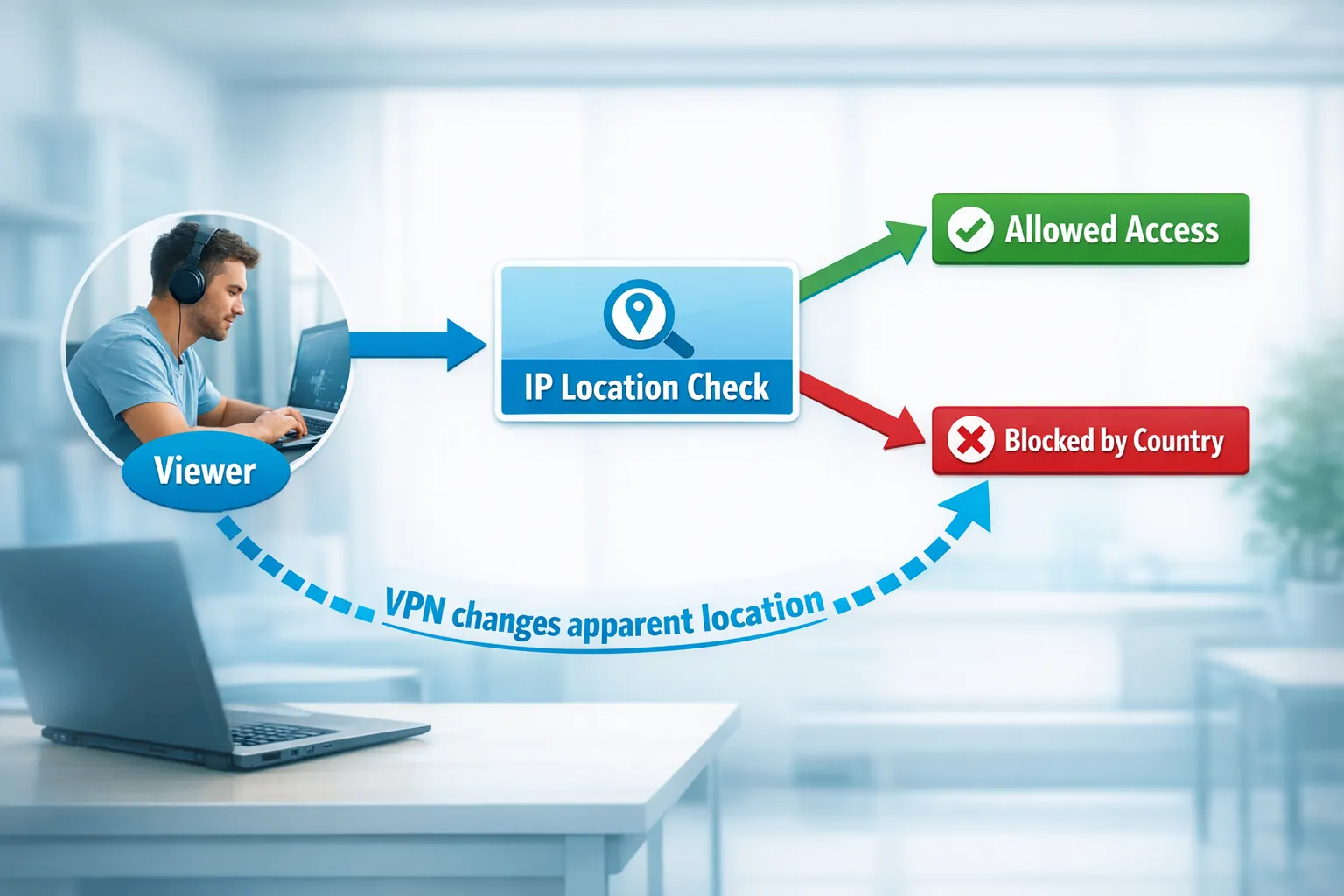
A VPN (virtual private network) routes someone’s internet connection through a server in another location, which can make them appear to be in a different country.
So if your country blocking decision is based mainly on a visitor’s apparent location, a VPN can sometimes make a viewer look like they’re outside the blocked country.
Can a VPN bypass country blocking?
In practice: sometimes.
Many platforms use IP geolocation as a key signal, but platforms can also use other signals to reduce fraud and abuse, like:
- Payment or billing indicators
- Device and session patterns
- Account history and verification checks
- Risk flags when location changes abruptly
You don’t need to know the exact method (and we shouldn’t pretend we do), just the takeaway:
A VPN can reduce the effectiveness of country blocking for determined viewers, but it doesn’t guarantee access.
What usually happens to VPN viewers
If someone tries to view your page from a blocked country using a VPN, common outcomes include:
- They can view your profile normally (if the VPN location is allowed).
- They can view the profile, but payment or login steps become “sticky” (more friction, more errors, more security checks).
- They get blocked anyway (because the platform flags other signals).
From a creator perspective, the most important point is:
Country blocking is a strong filter for casual traffic, not a guaranteed barrier against a motivated person.
Real-life scenarios: country blocking vs VPN users
Here’s a practical “what you’ll likely see” breakdown.
| Scenario | What actually happens | What it means for you |
|---|---|---|
| A casual viewer in your blocked country tries to open your page | Often blocked at the door (can’t view or can’t proceed normally) | Country blocking is doing its job for everyday privacy |
| Someone in your blocked country uses a VPN set to an allowed country | They may be able to view and subscribe, or they may hit security/payment friction | Don’t rely on country blocking alone if you’re protecting against a specific person |
| An existing subscriber travels (or uses a VPN) | They might still access, because they’re now “appearing” elsewhere | If you suspect someone you know, focus on user-level blocking |
| Your content is reposted on other sites | Country blocking doesn’t apply there | You need leak monitoring and takedowns, not just geo-blocks |
| Someone finds your promo account (TikTok/IG/X/Reddit) and connects dots | Country blocking doesn’t help with identity clues | Your anonymity setup matters as much as your OnlyFans settings |
The decision framework: when country blocking is “enough” vs when it’s not
To decide how hard you need to go on privacy, ask yourself one question:
Am I trying to prevent casual discovery, or am I trying to stop a specific person who would actively look?
Level 1: “I just don’t want random locals stumbling onto me”
Country blocking is often a solid baseline.
Add:
- Separate usernames across platforms
- Private socials, or separate creator-only accounts
- No identifiable backgrounds
If you’re in this category, you’ll probably like our guide on staying private while still growing: How to Secretly Promote Your OnlyFans (Without Friends or Family Finding Out).
Level 2: “I’m worried about coworkers, classmates, or my town”
Country blocking helps, but you also want to reduce “pattern matching.”
Add:
- Strong no-face strategy (if that’s your comfort level)
- Consistent content boundaries
- Aggressive leak prevention hygiene
A helpful next read: How to Make Money on OnlyFans Without Showing Your Face & Stay Anonymous.
Level 3: “I’m protecting against a specific person who would try hard”
Country blocking alone is not enough.
You need a layered plan that assumes:
- They may use a VPN
- They may use a different card/account
- They may search leak sites
- They may use your promo content to identify you
This is the “privacy stack” section below.
The privacy stack: 9 steps that matter more than country blocking
If your goal is “make discovery unlikely,” you want layers that don’t all fail the same way.
1) Use country blocking, but treat it like a filter
Enable it, keep it updated, and assume it blocks casual traffic best.
2) Block specific users fast
If you recognize someone (name, writing style, local references, social handle), block immediately.
3) Stop identity clues in content
This is the unglamorous part that saves you later.
Check for:
- Distinctive tattoos or jewelry
- Mail/packages with addresses
- Windows showing recognizable streets
- Reflections in mirrors, TVs, frames
- Audio clues (names, local accents, background voices)
4) Clean your promo funnel
Most “I got recognized” stories start off-platform.
If you promote, be careful with:
- Reusing your personal username anywhere
- Posting at the same times you do on your personal accounts
- Showing the same rooms, car interior, neighborhood spots
5) Remove metadata where possible
Photos and videos can contain metadata depending on how they’re created and shared.
You don’t have to become a cybersecurity expert, just build a habit: export content in a way that strips unnecessary details.
6) Watermark with intention
Watermarks won’t stop leaks, but they can:
- Reduce casual reposting
- Make it easier to prove ownership when requesting removals
Avoid watermarks that include your real name or personal identifiers.
7) Plan for leaks (because they happen)
Country blocking doesn’t matter if your content is elsewhere.
That’s why leak monitoring and takedowns are a real part of professional account management. If you want a bigger picture of how serious teams handle this, see: What can an OnlyFans Manager really do for you in 2025?.
8) Don’t let “privacy” isolate you from support
Privacy pressure can become constant hypervigilance. If you’re feeling anxious, numb, or obsessive about being found, it’s okay to talk to a professional.
Your boundaries matter as much as your income.
9) Decide your “panic protocol” in advance
If the wrong person finds you, you will think less clearly in the moment.
Write down your plan now:
- Who you tell (if anyone)
- What you lock down first (socials, link-in-bio, promo posts)
- What you delete vs archive
- What you say (and what you do not say)
Quick privacy checklist (do this today)
If you only have 30 minutes, do this:
- Confirm your country blocking settings are correct
- Review your last 20 promo posts for identifying clues
- Audit your display name, bio, and pinned post for local details
- Check the background of your top-selling sets/videos for reflections and “tells”
- Make a short list of usernames that look suspicious (and monitor them)
If you’re scaling and privacy is non-negotiable, it can be worth having a team handle this consistently while you focus on content.
“Someone bypassed my country block.” What should I do?
First, breathe. This doesn’t mean everyone can see you. It usually means one person tried harder than average.
Step-by-step response
- Block the user (creator-level block) if you have enough confidence it’s someone you want out.
- Screenshot and document the username, date, and messages.
- Review what gave you away: did they connect from a promo platform, recognize your room, or see a watermark?
- Tighten your funnel: remove identifying promo posts and simplify your link path.
- Increase leak monitoring if you suspect content theft.
A simple message template (if you need to delay without escalating)
Use this if you feel unsure and want time to decide (you do not owe anyone an explanation):
“Hey love, I’m a little swamped today. I’ll reply later when I’m free. ❤️”
Then you can step back, review, and block if needed.
Creator note: be careful using VPNs yourself
Some creators use VPNs for general privacy. That can be reasonable, but be consistent.
Sudden, repeated location changes can sometimes trigger extra security checks on many platforms (not just OnlyFans). If you choose to use a VPN:
- Avoid hopping countries constantly
- Keep your login behavior stable
- Prioritize account safety over experimentation
Where a management agency fits (and where it doesn’t)
If you’re reading this because privacy stress is eating at you, here’s the honest tradeoff:
- Going solo can work, but you must run privacy like an operations system, not a “set it once” setting.
- A good OnlyFans management agency can help implement and maintain layers like country blocking setup, leak monitoring, DMCA takedowns, and security routines, but you’re still a public-facing creator brand, and there is always some risk.
If you’re evaluating support, read these first so you don’t get burned:
- Working With an Agency vs Running OnlyFans Alone
- 6 Red Flags to Watch Out for Before Signing with an OnlyFans Agency
- OnlyFans Scam: How Agencies, Managers and Chatters Rob the Creators
Frequently Asked Questions
Does country blocking stop people in that country from seeing my OnlyFans? Country blocking usually reduces access for visitors who appear to be in that country, but it’s best viewed as a strong filter, not a perfect shield.
Can someone use a VPN to bypass country blocking? Sometimes. A VPN can change a viewer’s apparent location, but platforms may use additional signals and security checks, so results vary.
If someone bypasses my block, does that mean my account is “exposed”? Not necessarily. It often means one viewer tried harder than average. Tighten your promo funnel, block suspicious users, and review your content for identifying clues.
Is country blocking enough to keep family from finding me? It helps, but most “found out” situations happen through off-platform clues (promo accounts, reused usernames, recognizable backgrounds). Use a layered privacy setup.
Does leak protection matter if I already use country blocking? Yes. If your content leaks to other sites, country blocking won’t apply there. Leak monitoring and takedowns are a separate (and important) layer.
Want a privacy-first setup that doesn’t kill your growth?
If you want to grow while keeping strong boundaries, Lookstars can help creators with country blocking and privacy setup, content leak protection (monitoring and takedowns), strategic posting, and 24/7 fan chatting so your account isn’t vulnerable when you’re asleep.
Learn more about how we work at Lookstars Agency, or explore our guides first and apply only when you feel confident it’s the right move.


Ready to transform your career?
Join hundreds of creators already earning six figures with Lookstars Agency.
Share this article
Best OnlyFans Agency
Europe's Leading OnlyFans Management Agency.

100% Free Ebook
Get our guide and unlock the secrets to OnlyFans success.
100% Free Ebook
Get our guide and unlock the secrets to OnlyFans success.
Free Revenue Calculator & Profile Analyzer
Try them for freeContinue reading...

Am I Attractive Enough for an OnlyFans Agency? The Answer

Can You Ever Fully Delete Your OnlyFans Content? The Reality
