Best Time Zones For Posting on OnlyFans in the US
If you’re promoting to the US, “what time should I post?” quietly becomes a money question. . . Not because OnlyFans has a big public “explore” page (it does...

If you’re promoting to the US, “what time should I post?” quietly becomes a money question.
Not because OnlyFans has a big public “explore” page (it doesn’t), but because timing affects three things that do move revenue:
- Push notifications and “top of feed” visibility for your current subscribers.
- DM reply speed (your fans are awake, bored, and ready to spend).
- Your off-platform promo rhythm (Reddit/Twitter/X, IG teasers, etc.) that feeds new subscribers into your link.
Below is a practical way to pick the best time zones for posting on OnlyFans in the US, plus a testing plan you can run this week.
Quick reality check: it’s not about your time zone, it’s about theirs
OnlyFans shows posts chronologically for most fans. So the “best” time is when your subscribers are most likely to:
- Open the app
- Scroll
- Like/comment (which keeps you mentally “top of mind”)
- Reply to your DMs
- Buy PPV in that impulse window
That means your posting schedule should be built around US audience time zones, not where you live.
If you don’t know where your buyers are, start with the most common situation: a US-heavy audience split across Eastern and Pacific, with Central and Mountain in between.
The simplest answer: use Eastern Time as your default anchor
For most US-targeting creators, Eastern Time (ET) is the best “default” time zone to plan around.
Why?
- A large chunk of US consumers live in ET and CT, so ET prime time captures a lot of paying eyes.
- ET also creates workable overlap with the West Coast if you post later in the evening.
If you’re overwhelmed, do this first:
- Feed post: 7:00–10:00 PM ET
- Mass DM (PPV drop): 8:00–11:00 PM ET
- Story / casual check-in: 12:00–3:00 PM ET
Then you refine based on your own data.
Best posting windows (US): feed posts vs PPV drops vs Lives
Different actions work best at different times. A “cute teaser post” behaves differently than a “locked PPV message” or a live stream.
Here are the windows that typically perform well for US audiences.
1) Feed posts (retention and daily engagement)
Feed posts do best when fans can actually stop and look.
- Weekdays: 6:00–10:00 PM local time
- Weekends: 11:00 AM–2:00 PM local time and 7:00–11:00 PM local time
Why: after-work couch scrolling, late-night alone time, weekend boredom.
2) PPV mass DMs (revenue moment)
PPV buys are often impulse-driven. You want fans awake, relaxed, and on their phones.
- Best window: 8:00–11:30 PM local time
- Secondary window: 12:00–2:00 PM local time (especially weekends)
If your PPV is more “conversation-based” (you tease, flirt, then close), the best time is simply when you can reply fast.
If you want a deeper PPV approach, pair this with your pricing and packaging strategy in: How Much to Charge for PPV on OnlyFans.
3) Lives (high tips + high intimacy)
Lives work best when people can stay for 20 to 60 minutes.
- Weekdays: 9:00 PM–12:00 AM local time
- Weekends: 9:00 PM–1:00 AM local time
If you’re newer to live, read: How to Stream on OnlyFans Live Like a Pro.
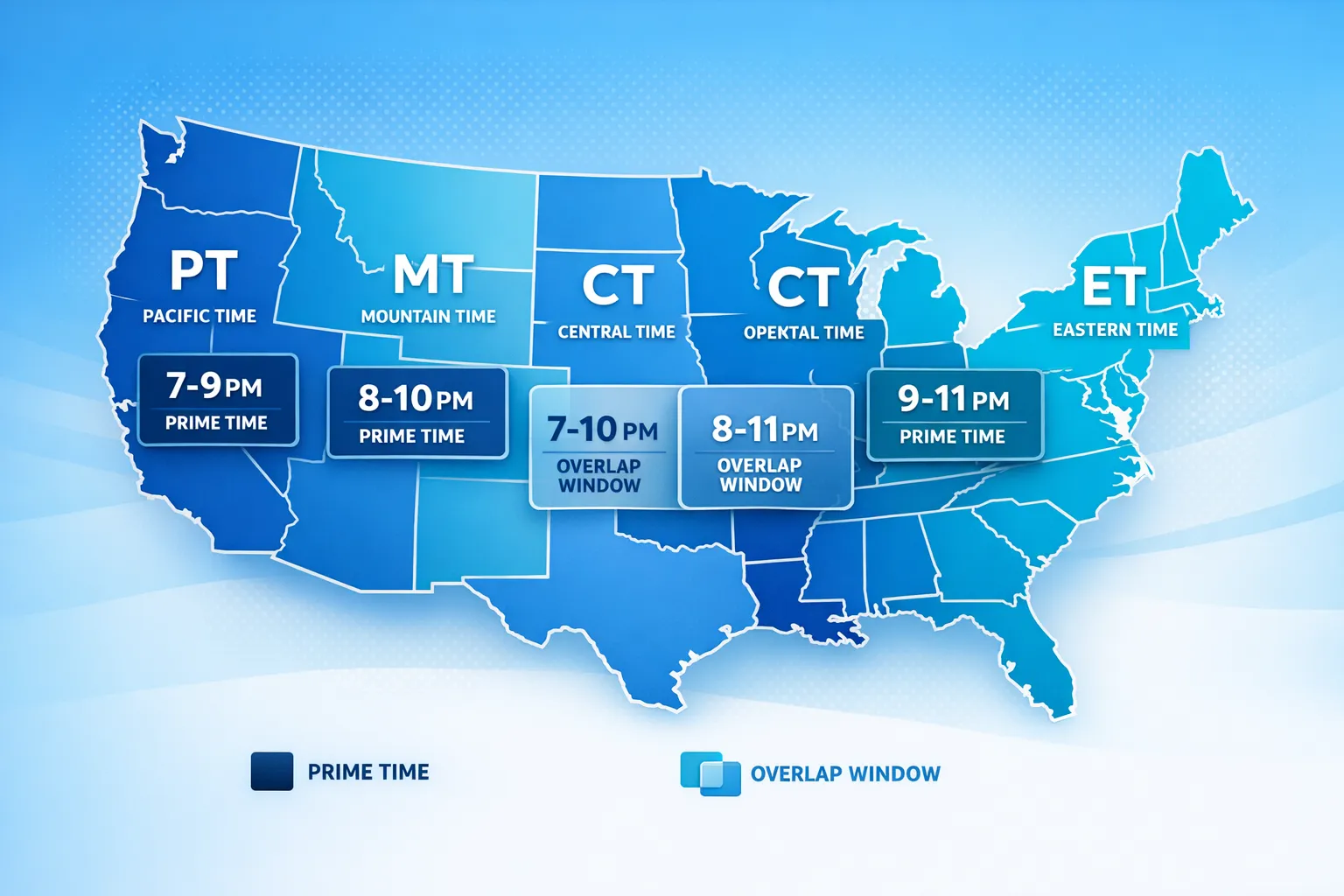
The overlap strategy: one post that hits multiple US time zones
If you have subscribers across the US, the goal is not “perfect timing” for every state. The goal is to hit an overlap window where two or more time zones are active.
The best overlap window for most creators
9:00–10:30 PM ET is a strong overlap because it’s:
- Prime time on the East Coast
- Dinner to evening on the West Coast (6:00–7:30 PM PT)
That’s often a sweet spot for:
- A strong feed post
- A mass DM with a teaser + lock
- A “going live in 30 minutes” announcement
US time zone conversion table (prime time overlap)
Use this to plan without doing mental math every day.
| If you post at… | ET | CT | MT | PT |
|---|---|---|---|---|
| “East Coast prime time” | 9:00 PM | 8:00 PM | 7:00 PM | 6:00 PM |
| “Late-night buyers” | 11:00 PM | 10:00 PM | 9:00 PM | 8:00 PM |
| “Lunch scroll” | 1:00 PM | 12:00 PM | 11:00 AM | 10:00 AM |
If you can only pick one nightly slot, start with 9:00 PM ET and adjust.
How to choose the best time zone for your account (decision framework)
Instead of guessing, pick your “posting time zone” based on where your business is already working.
Step 1: Identify your bottleneck
Ask yourself:
- Traffic is low: You need promo timing (Reddit/X) more than OnlyFans feed timing.
- Traffic is fine but subs are low: Your profile, pricing, and welcome flow matter more.
- Subs are fine but PPV is weak: Your DM timing and reply speed are the lever.
If you’re building traffic from X, this guide helps: Marketing OnlyFans on Twitter (X): What Actually Works).
Step 2: Pick a primary time zone
Choose one primary time zone so your schedule is consistent and easy to execute.
- Choose ET if: you have a broad US audience, you sell well at night, or your buyers feel “East Coast heavy.”
- Choose CT if: your audience feels Midwest-heavy, or your best buyers respond slightly earlier.
- Choose PT if: your niche skews West Coast (or you personally do best posting later).
Step 3: Add one “supporting” time slot
If you pick ET as primary, add one extra slot that catches the other side of the US.
Example:
- Primary: 9:00 PM ET (post + DM)
- Support: 12:30 PM ET (story + casual DM warm-up)
That gives you both late-night and midday coverage without living on your phone.
A 2-week testing plan (so you stop arguing with yourself)
You don’t need fancy tools. You need clean tests.
What to test
Pick one content type to test at a time:
- Feed post
- Mass PPV DM
- Live announcement
How to test (simple A/B)
- Week 1: Post at 8:30 PM ET
- Week 2: Post at 10:30 PM ET
Keep everything else similar: same day of week, similar content intensity, similar price.
What “winning” looks like
Track:
- Likes/comments in the first 60 minutes
- DM replies in the first 30 minutes
- PPV unlock count (or tips) within 12 hours
- New subs within 24 hours (if you promoted off-platform)
If you want a clean tracking setup for promo links, use: OnlyFans Tracking Links Guide.
Recommended US schedule templates (pick one)
These are starter templates, not rules. The best schedule is the one you can repeat without burning out.
Template A: Beginner-friendly (3 touchpoints per week)
- Mon/Wed/Fri: Feed post at 9:00 PM ET
- Tue/Sat: Mass DM at 10:00 PM ET
- Sun: Story check-in at 1:00 PM ET
Template B: Growth mode (daily presence, still realistic)
- Daily: Story or short post at 12:00–2:00 PM ET
- 4 to 5 days/week: Feed post at 8:00–10:00 PM ET
- 2 to 3 days/week: Mass PPV DM at 9:30–11:00 PM ET
If you need ideas that match different “levels” of explicitness and effort, bookmark: Best OnlyFans Content Ideas.
Common mistakes creators make with US time zones
Mistake 1: Posting when you’re free, not when your buyers are awake
If you’re posting at 2:00 AM ET because you finally finished editing, you’re basically choosing “low engagement mode.”
Fix: batch content and schedule, or set a hard cutoff and post the next day.
Mistake 2: Sending PPV when you can’t reply
Many PPV sales are won in the follow-up.
If you drop a spicy locked message and then disappear for 3 hours, you lose the impulse window.
Fix: send PPV when you can be available for at least 30 to 60 minutes.
Mistake 3: Treating all US fans the same
A night-shift guy in Texas behaves differently than a 9-to-5 subscriber in NYC.
Fix: segment in your head (even if you don’t use a CRM yet). High spenders often have repeat habits. Learn them.
Mistake 4: Ignoring privacy when targeting the US
Some creators want US money but still want local privacy (especially if they live in the US).
Use features like country blocking and safe promotion practices. If privacy is a concern, start here: How to Secretly Promote Your OnlyFans (Without Friends or Family Finding Out).
Quick checklist: find your best US time zone this week
- Pick your primary time zone (start with ET if unsure)
- Choose one main “prime time” slot (start with 9:00 PM ET)
- Choose one support slot (start with 1:00 PM ET)
- Test for 2 weeks, one variable at a time
- Track early engagement and 12-hour revenue
- Keep what works, delete what drains you
Frequently Asked Questions
Is Eastern Time always the best time zone for posting on OnlyFans in the US? Not always, but it’s a strong default for US-targeting creators because it captures a large portion of US evening activity and still overlaps with the West Coast.
What’s the best time to send PPV messages to US subscribers? Many creators see stronger PPV results in the evening, roughly 8:00–11:30 PM in your audience’s local time, because fans are more relaxed and likely to buy.
Should I post twice to hit both East Coast and West Coast prime time? Only if you can do it without burnout. A smarter approach is one overlap post (around 9:00–10:30 PM ET) plus one midday touchpoint.
How do I know which US time zone my best buyers are in? Use your chat patterns, when tips/PPV unlocks happen, and tracking links for your promo sources. If you’re not sure, run a simple 2-week timing test.
Want your posting times, PPV drops, and DMs planned for you?
If you’re tired of guessing, Lookstars helps creators grow with a full management system: marketing, strategic posting, and 24/7 fan chatting (so your best US time windows don’t go to waste). We also prioritize privacy, including leak monitoring and takedowns.
If you want support without upfront costs or long-term lock-ins, explore Lookstars here: Lookstars OnlyFans Management Agency.
For decision help first, read: Working With an Agency vs Running OnlyFans Alone.



Ready to transform your career?
Join hundreds of creators already earning six figures with Lookstars Agency.
Share this article
Best OnlyFans Agency
Europe's Leading OnlyFans Management Agency.

100% Free Ebook
Get our guide and unlock the secrets to OnlyFans success.
100% Free Ebook
Get our guide and unlock the secrets to OnlyFans success.
Free Revenue Calculator & Profile Analyzer
Try them for freeContinue reading...

Am I Attractive Enough for an OnlyFans Agency? The Answer

Can You Ever Fully Delete Your OnlyFans Content? The Reality
