Avoiding OnlyFans Screen Recording Leaks: What Helps and What Doesn''t
If you’ve ever seen your content pop up on a leak site or get passed around in DMs, you already know the most frustrating part: screen recording leaks don’t ...
If you’ve ever seen your content pop up on a leak site or get passed around in DMs, you already know the most frustrating part: screen recording leaks don’t require a “hack.” A subscriber can simply record their screen, and now your paywalled work is shareable.
The goal of leak prevention is not “perfect protection” (that’s not realistic), it’s reducing leaks, discouraging casual theft, identifying sources faster, and removing stolen content quickly. This guide breaks down what actually helps, what doesn’t, and what to do the moment a leak happens.
Why screen recording leaks are so hard to stop
Screen recording is happening on the viewer’s device (their phone, their laptop, their screen capture software). That means:
- Even if a platform disables downloads, someone can still record.
- Even if you block right-click, someone can still record.
- Even if you lower resolution, someone can still record.
So instead of chasing “anti-recording” gimmicks, think in layers: deterrence, access control, attribution, and enforcement.
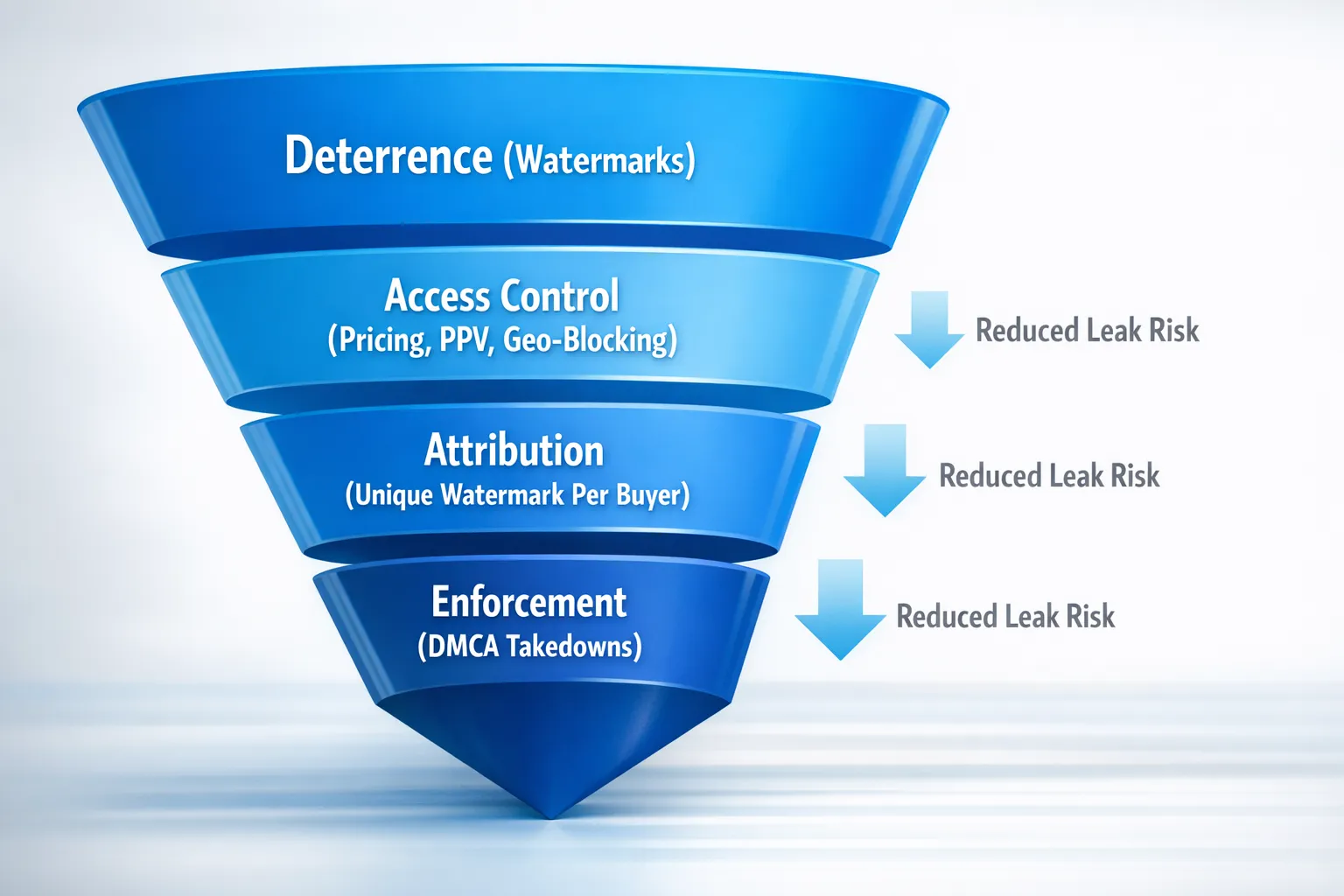
The 4-layer framework that actually reduces screen recording leaks
Layer 1: Deterrence (make stealing feel risky and annoying)
Deterrence doesn’t stop a determined leaker, but it stops a lot of casual ones.
What helps most:
- Visible watermarking on photos and videos (not tiny, not hidden in a corner).
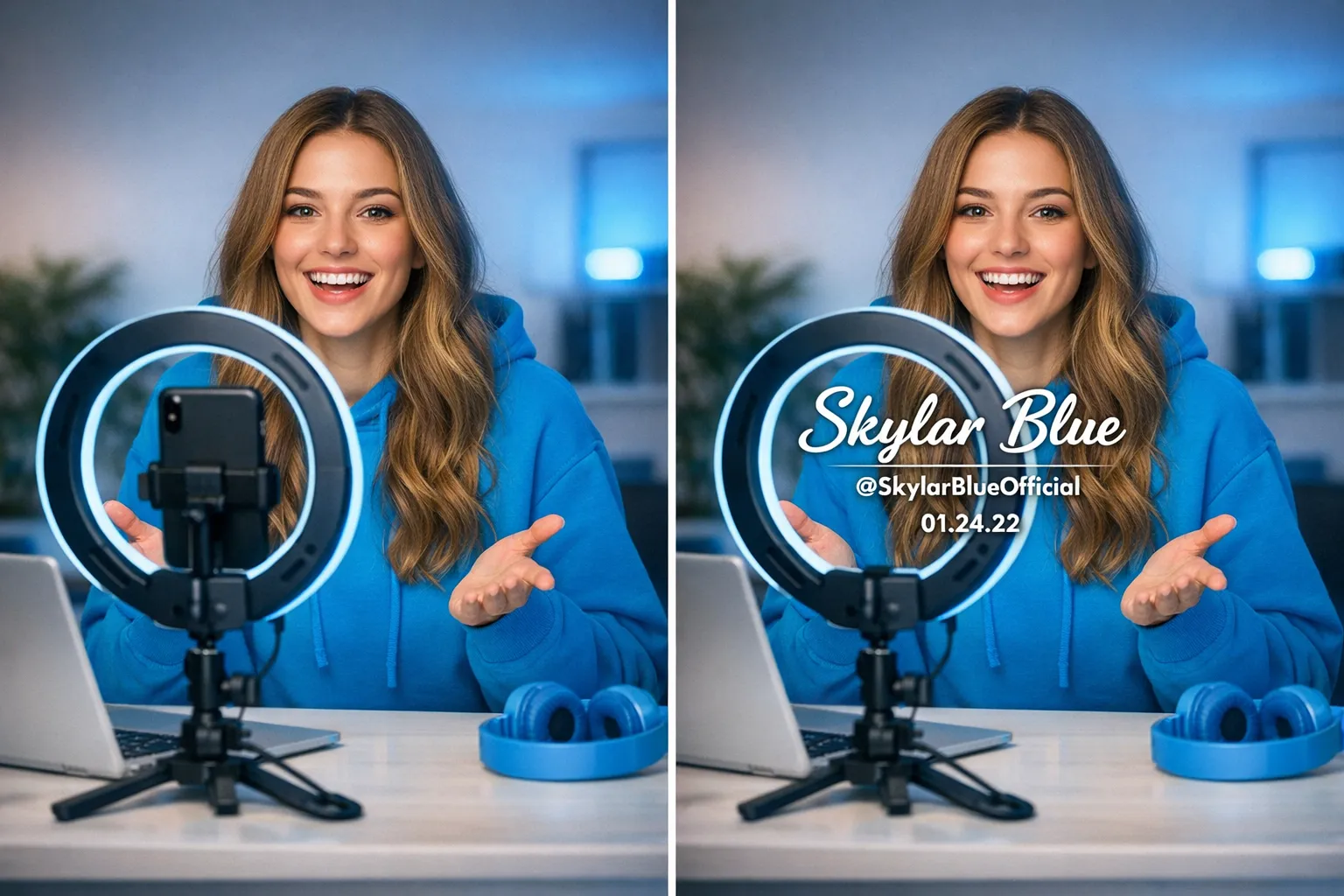
- “Identity-style” watermarks that look personalized, even if they’re not (example: your stage name + “OnlyFans” + date).
- Placement that’s hard to crop (across the mid-frame, not only at the bottom).
Practical watermark formula (fast and effective):
- Your stage name
- Your OnlyFans handle
- Date or content code (example: “FEB2026-SET03”)
This makes stolen clips less valuable because they still advertise you, and it makes reposting more effort.
Tradeoff: watermarks reduce the “clean” aesthetic. Many top creators accept this because the alternative is losing control of distribution.
Layer 2: Access control (reduce the number of people who can leak)
Leaks often come from one of two groups:
- Free or low-intent subscribers who join impulsively and don’t respect boundaries
- High-intent “collector” types who hoard and repost
You can’t perfectly predict who leaks, but you can reduce exposure.
What helps:
- Limit ultra-explicit content in the feed and use PPV for your most valuable sets. The fewer people who automatically receive it, the lower the leak surface.
- Be cautious with free trials and free pages if leaks are a major fear. Free access increases volume, and volume increases leak probability.
- Use country blocking (geo-blocking) where it’s relevant to your safety and anonymity. It’s not leak-proof (VPNs exist), but it reduces casual local discovery.
- Block fast on red flags (new sub instantly asks for “all your vids,” requests off-platform, or talks like a reseller).
If anonymity is part of your safety plan, pair leak control with a broader privacy setup. This guide can help: How to Make Money on OnlyFans Without Showing Your Face & Stay Anonymous.
Layer 3: Attribution (make leaks traceable)
Attribution is where creators get the biggest “real” control back.
What helps:
- Personalized watermarks for customs and high-ticket content (even simple text overlays like “Made for: @username”).
- Unique “vault codes” placed subtly (example: small code on a wall, mirror, or background area that changes per buyer).
When a leak happens, attribution gives you leverage:
- You can identify the source subscriber faster.
- You can block them immediately.
- You can include clear proof when reporting.
Tradeoff: personalization takes time. Many creators only do it for customs, VIP drops, and top-spender bundles.
Layer 4: Enforcement (remove stolen content quickly and repeatedly)
Even with deterrence and attribution, leaks can happen. The difference between “annoying” and “income-damaging” is often response speed and consistency.
What helps:
- DMCA takedown processes (either DIY or managed).
- Reporting leaked content to:
- the hosting website
- the platform where it’s being shared (socials, forums)
- search engines when applicable
Important note: this is educational, not legal advice. DMCA rules and processes can vary by country and situation. Policies change, verify with official sources or a professional.
For an official overview of how DMCA works in the US, see the U.S. Copyright Office DMCA section.
What helps vs what doesn’t (quick comparison table)
Here’s a reality check you can use to stop wasting energy on “false security.”
| Tactic | Helps with | Doesn’t help with | Best use case |
|---|---|---|---|
| Visible watermarks | Deterring casual reposting, branding stolen clips | Stopping recording entirely | All content, especially video |
| Personalized watermark (username) | Identifying leaker, stronger reports | Preventing initial leak | Customs, VIP bundles |
| Geo-blocking | Reducing local discovery, privacy | VPN users, global leak sites | Creators worried about family/coworkers |
| Keeping explicit content mostly PPV | Lower exposure surface | Leaks from PPV buyers | High-value sets |
| DMCA takedowns | Removing copies over time | Instant removal everywhere | Ongoing leak management |
| “No recording” warning text | Setting boundaries, mild deterrence | Actual enforcement | Add to bio and welcome message |
| Lower resolution content | Slightly reduces resale value | Recording, reposting | Only if it doesn’t hurt conversions |
| Blocking right-click / “download protection” | Stops basic downloading | Screen recording, phones filming screens | Don’t rely on it |
Myths that waste your time (and what to do instead)
Myth: “If I make it ‘private,’ no one can leak it.”
A paywall controls access, not behavior. A subscriber can still record.
Do instead: watermark + PPV gating for premium drops.
Myth: “If I post previews only, I’m safe.”
Teasers can still be reposted, and they can still be used to dox or harass.
Do instead: keep teasers SFW-ish when privacy matters, and remove metadata from files when possible.
Myth: “I’ll just threaten legal action in DMs.”
Sometimes it works, often it escalates, and it can attract the wrong attention.
Do instead: take action calmly: block, report, and run takedowns.
Myth: “Watermarks look unprofessional.”
Unwatermarked content is what leak communities want most.
Do instead: use clean, consistent branding watermarks that match your vibe (light, elegant, readable). It can actually look more premium.
Your 24-hour leak response plan (copy this)
When you discover a leak, your nervous system goes into panic mode. A checklist keeps you focused.
Within the first hour:
- Screenshot the leak page (URL visible).
- Save proof of ownership (original file, upload date, platform link).
- If your watermark or code is visible, record it.
- Block the suspected subscriber if you can identify them.
Within 24 hours:
- File takedown requests with the hosting site (and any repost platforms).
- Request de-indexing when applicable (search engine removals are a separate process from website takedowns).
- Search for re-uploads using:
- your stage name
- your OF handle
- the watermark code (example: “FEB2026-SET03”)
Ongoing (weekly):
- Re-check the biggest leak sources where your niche gets reposted.
- Keep a simple log (date, URL, action taken, outcome).
This is also where many creators decide they need help, because enforcement is time-consuming and emotionally draining.
A simple message template you can send when you suspect a leaker
This won’t stop everyone, but it’s useful when you have strong attribution (like a custom marked “made for @username”).
DM template (firm, calm):
“Hey love. I found one of my paid videos reposted with your watermark on it. That’s not okay.
I’m blocking this account and I’m filing takedowns with the site(s) hosting it. Please don’t contact me again.”
You’re not negotiating, you’re documenting and moving on.
If you hire help for leak protection, ask these questions first
Leak protection is a common buzzword. Before you trust anyone with your content or account, get clarity.
Evaluation checklist:
- Do you actively monitor for leaks, or only respond when I find them?
- What’s your takedown workflow, and what info do you need from me?
- Do I keep full ownership of my content and accounts?
- How do you handle privacy settings (country blocking, security setup)?
- What happens if I want to leave, and what access do you keep?
If you’re vetting management generally, these are worth reading:
- OnlyFans Scam: How Agencies, Managers and Chatters Rob the Creators – And How to Stay Safe
- 6 Red Flags to Watch Out for Before Signing with an OnlyFans Agency
- What can an OnlyFans Manager really do for you in 2025?
Where Lookstars fits (and who it’s not for)
Lookstars is an OnlyFans management agency that includes content leak protection (monitoring + DMCA takedowns) and privacy support (including country blocking and security setup) alongside marketing, fan growth, and account management.
Lookstars may be a fit if:
- You’re already earning (or consistently posting) and leaks are becoming a recurring stress.
- You want enforcement handled without you spending hours chasing links.
- You want to scale while keeping privacy tighter (especially if you’re a no-face creator).
It might not be a fit if:
- You want a guarantee that leaks will never happen (nobody can promise that).
- You don’t want any outside team involved in operations.
- You’re not ready to treat your page like a business yet (systems matter).
Frequently Asked Questions
Can you prevent OnlyFans screen recording leaks completely? No. If someone can view content on a device, they can usually record that device. What you can do is reduce leak frequency and impact with layered protection.
Do watermarks actually work, or do leak sites just blur them? Watermarks work best as deterrence and branding. Some repost pages blur or crop, which is why centered placement and repeated watermarking (light but readable) helps.
Is geo-blocking worth it? For privacy, yes, especially if you’re worried about people you know finding you. For leak prevention, it reduces casual local access but doesn’t stop VPN users.
Should I avoid free trials if I’m worried about leaks? Often, yes. Free access increases volume and lowers intent, which can increase leak risk. If you use free trials, consider limiting what those users can access (teasers vs premium drops).
What’s the fastest way to get leaked content removed? Act quickly, document proof, and file takedowns consistently. Removals can take time and may require repeat requests across multiple hosts.
If I’m anonymous, can leaks expose my real identity? Leaks can increase risk if your promo accounts, usernames, metadata, tattoos, locations, or patterns connect back to you. If anonymity is critical, build a full privacy system (not only leak takedowns).
Want leak protection handled for you (without upfront costs)?
If you’re tired of playing whack-a-mole with screen recordings and reposts, you don’t have to do it alone. Lookstars helps creators with content leak protection, privacy setup, and account management, so you can focus on making content and keeping your boundaries.
Explore the agency and apply here: Lookstars OnlyFans Management Agency
If privacy is your top concern, also read: How to Secretly Promote Your OnlyFans (Without Friends or Family Finding Out)


Ready to transform your career?
Join hundreds of creators already earning six figures with Lookstars Agency.
Share this article
Best OnlyFans Agency
Europe's Leading OnlyFans Management Agency.

100% Free Ebook
Get our guide and unlock the secrets to OnlyFans success.
100% Free Ebook
Get our guide and unlock the secrets to OnlyFans success.
Free Revenue Calculator & Profile Analyzer
Try them for freeContinue reading...

Am I Attractive Enough for an OnlyFans Agency? The Answer

Can You Ever Fully Delete Your OnlyFans Content? The Reality
